I used an AI humanizer tool to try to pass an Originality AI scan, but now I’m unsure if my content is safe, ethical, and actually reads well for real people. Can anyone share experience or advice on how reliable these humanizer tools are with Originality AI, and what I should watch out for so I don’t hurt my SEO or credibility?
Originality AI Humanizer review, from someone who tried to push it hard
I went into this one with a weird kind of expectation. Originality is known for their AI detector, so I figured their humanizer would be at least halfway dangerous.
It was not.
What I tested
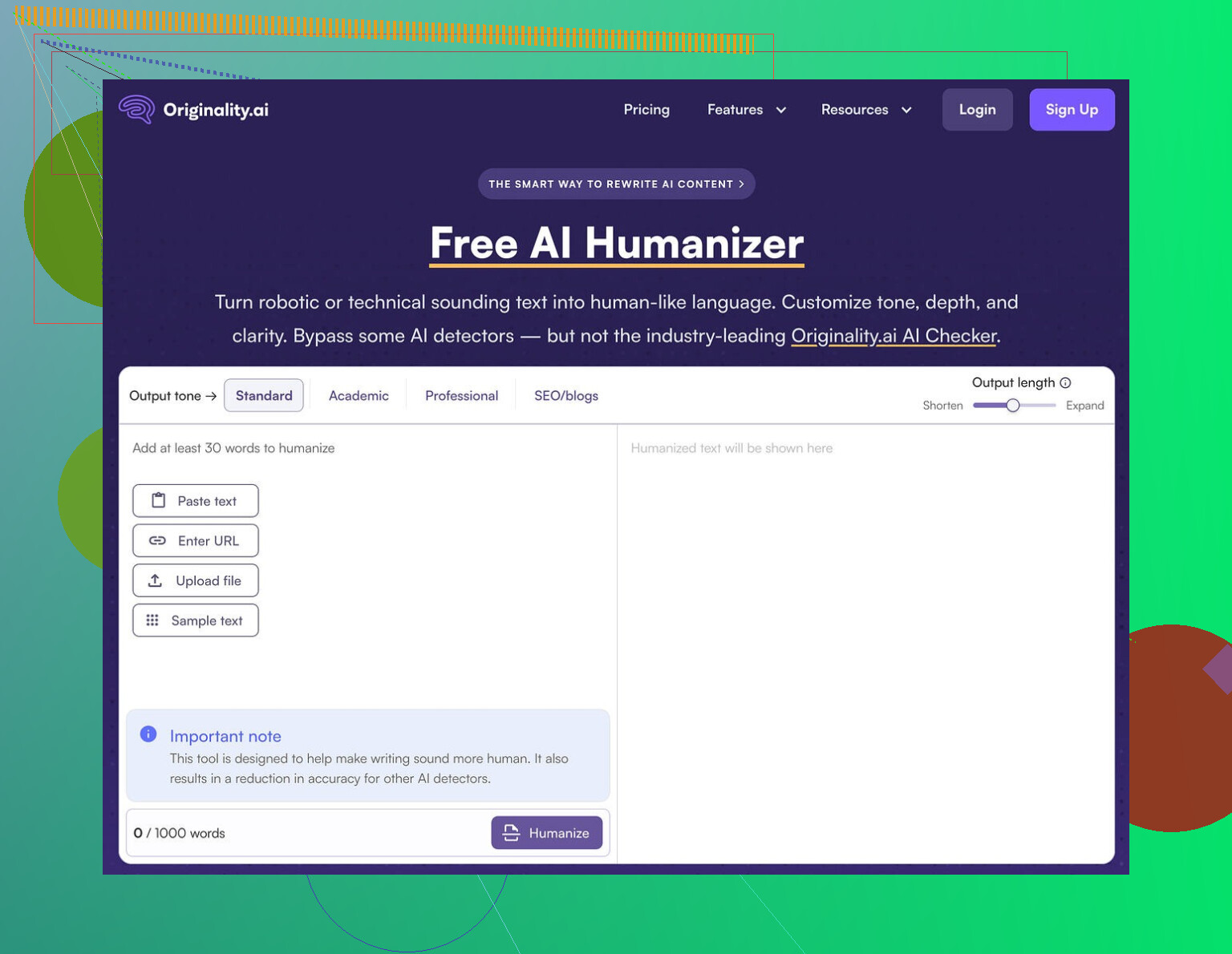
I fed the Originality AI Humanizer several chunks of ChatGPT text, each over 300 words, then split them to fit the tool’s 300 word cap.
I ran the outputs through:
- GPTZero
- ZeroGPT
I tried both modes:
- Standard
- SEO/Blogs
I repeated runs a few times to see if randomness helped.
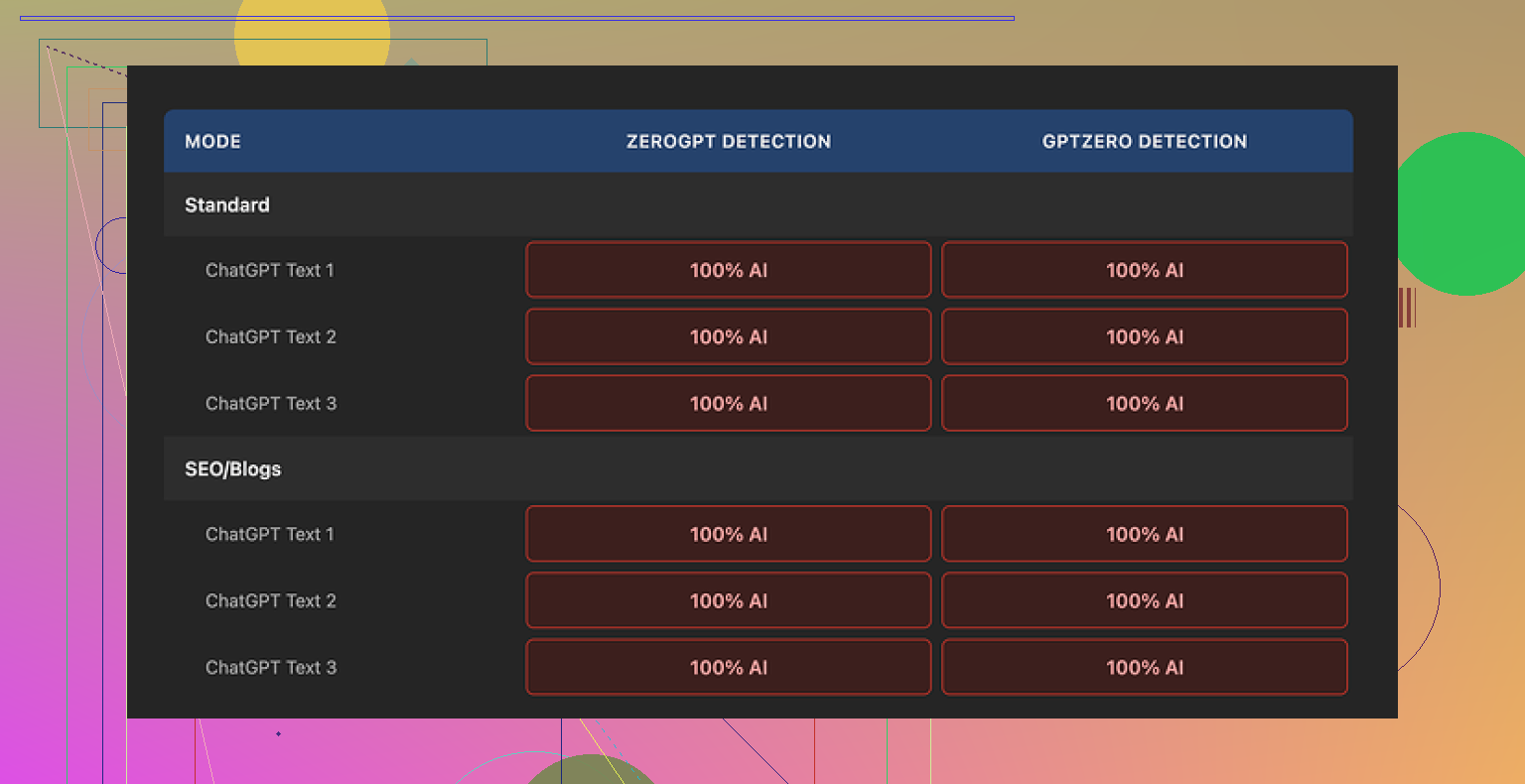
Results were boring. Every single output came back as 100% AI on both detectors. No wobble, no borderline calls, just full AI flags across the board.
What it does to your text
Short version: almost nothing.
Longer version:
- Sentence structure stayed almost identical.
- Same pacing.
- Same common AI phrases survived untouched.
- It kept em dashes and other typical AI tells.
- Word swaps were minimal and shallow, more like a light thesaurus pass.
So when you read “humanized” text from this tool, you are mostly reading the original ChatGPT output with some cosmetic edits.
That creates a weird problem. You cannot fairly review its writing quality, because you are still looking at ChatGPT’s work. The humanizer is more like a lint roller than an editor.
Screenshots
Here is how it looks in practice:
You drop in text, pick Standard or SEO/Blogs, adjust the length slider, click, and you are done. No knobs for style, no real control over structure.
The good parts
To be fair, it is not all bad.
What I liked:
-
Free to use
No sign up. No credit card wall. You put in text and it spits something out. -
Privacy stance
Their privacy policy is written like someone who understands legal risk. They mention data use and give a retroactive opt out for AI training. That is rare enough to notice. -
Output length slider
You can stretch or shrink the text a bit. Helpful if you need to hit a rough word range without thinking too hard. -
Low friction
I hit the site, used it, closed it. Zero onboarding friction.
Annoyances and limits
It is free, but there are catches.
-
300 word limit per session
I ended up opening multiple incognito windows and chopping text into blocks to process longer pieces. It works, but it is tedious and fragile. Not something you want to do every day. -
No real humanization controls
No sliders for randomness, sentence restructuring, tone shift, or vocabulary level. You pick a mode and hope. The underlying behavior feels fixed. -
SEO/Blogs mode does nothing special
I tried SEO/Blogs mode expecting longer sentences, keyword-looking phrases, maybe more filler. Detection scores stayed 100% AI. Style differences were minor at best.
What it seems to be built for
After a bit of use, the product feels less like a serious humanizer and more like a front door.
The flow looks like this:
- You search for a free AI humanizer.
- You end up on Originality’s humanizer page.
- You try it, fail to bypass detection.
- You start clicking around and see their paid AI detection tools.
- You are now in their main product funnel.
From a business angle, it makes sense. From a user angle, if you want real detection bypass, this tool does not help.
If your goal is bypass
If you are trying to get text past detectors, this is not the tool to rely on. On my tests:
- GPTZero: 100% AI, every time.
- ZeroGPT: 100% AI, every time.
No partial success. No improvement over raw ChatGPT text.
After trying a bunch of humanizers, the only one that gave me passable scores while keeping the text readable was Clever AI Humanizer, and it is also free:
Quick take
If you:
- want a light rewrite for style and do not care about detection
then Originality’s humanizer is a free, low-effort option, though you might get similar results from any basic rewriter.
If you:
- need to pass AI detectors in school, freelance work, or client projects
this tool does nothing useful for you. Use something else or rethink your process.
That is how it behaved for me over multiple tests, across multiple detectors.
4 Likes
You are asking three things at once:
- Will humanized text pass Originality AI.
- Is it ethical.
- Does it read well.
Short answer for each.
- Reliability for detection
AI humanizers are hit or miss.
What I have seen across tools:
• Originality’s own humanizer barely changes structure. Detectors still flag it.
• Other detectors like GPTZero and ZeroGPT often still mark “humanized” text as AI if the structure looks like LLM output.
• The more a tool rewrites syntax and paragraph flow, the better it tends to perform on scans, but the higher the risk of nonsense or factual errors.
If you really need lower AI scores and still-readable text, Clever Ai Humanizer tends to do more than light synonym swaps. It rewrites rhythm and sentence patterns, so it behaves closer to a strong rewrite than a polish tool. That helps for Originality AI, but results still vary by topic and length. You have to test your own samples.
If Originality is your target, run your exact final draft through it yourself. Do not trust “works on all detectors” claims from any site.
- Ethics
This depends on context, not on which humanizer you use.
Rough guide:
• Homework, theses, graded essays. Using AI plus a humanizer and pretending you wrote it is academic misconduct in most schools. Even if the detector says “human,” the policy does not change.
• Client work where you claim “fully human written” and you deliver AI + humanizer with no disclosure, that crosses an ethical line. You sell one thing and deliver another.
• SEO content, blog posts, internal docs. Many teams accept AI-assisted writing. If your client, editor, or company is ok with AI support, then using a humanizer is more of a quality step than a moral issue, as long as facts are checked.
• Anything medical, legal, financial, safety related. Using automated rewrites without manual review is risky. If someone relies on your text and gets harmed, “the tool changed it” will not help you.
If you feel nervous telling the other party what you did, that is usually a sign the use is not aligned with their expectations.
- Does it read well for humans
AI humanizers rarely improve logic or clarity. They mostly target “style signals” that detectors look at.
To check if your result is safe for readers:
• Read it out loud. If you trip over phrases or it feels stiff, readers will feel the same.
• Print it or view it on a phone and read from start to finish. Look for repetition, generic phrases, and circular points.
• Ask one real person to read and tell you where they got bored or confused. No need to say you used AI. Ask what sounded weird or robotic.
• Run it through a grammar checker, but do not obey everything. Fix only real errors and clear awkward spots.
Practical workflow that keeps ethics and quality in line
If you still want to use AI and a humanizer without feeling sketchy:
- Generate a draft with AI.
- Run it through something like Clever Ai Humanizer if you must reduce AI detector hits.
- Edit heavily by hand. Change structure. Move paragraphs. Add your own examples, opinions, and stories. Delete generic filler.
- Check facts against original sources. AI and humanizers both hallucinate.
- If this is for school or somewhere AI is banned, stop here and rewrite in your own words from scratch using the AI draft only as notes.
Where I slightly disagree with @mikeappsreviewer
They focus a lot on bypassing detectors. I think the more important part is: even if a humanizer perfectly fooled every tool, you still deal with ethics and quality. A clean score does not mean safe or honest content.
Detection evasion should be the last step, not the main goal. Your first filter should be “would I be ok if the teacher, client, or boss knew exactly how this was written.”
If your answer to that is yes, then experiment with tools. If your answer is no, the problem is not Originality AI, it is the use case.
Short version: if you’re relying on humanizers to “fix” everything, you’re playing roulette with three different problems at once: detection, ethics, and readability.
I mostly agree with @mikeappsreviewer and @byteguru on the reliability side, but I think people over-focus on the tools and under-focus on what the text actually is and what you’re using it for.
Here’s how I’d break it down, without rehashing their step‑by‑step stuff.
- Reliability of humanizers for Originality AI (and others)
Detectors are pattern spotters, not truth machines. Humanizers try to scramble those patterns. That game has a few ugly realities:
-
“Light” humanizers:
Stuff like Originality’s own humanizer that barely changes structure is almost pointless for bypass. Same skeleton, same rhythm, just swapped words. Detectors still go “yep, AI.” -
“Aggressive” humanizers:
Tools that actually rearrange syntax, break up sentences, and change rhythm can drop the AI score. This is where Clever Ai Humanizer tends to be more useful, because it behaves more like a real rewrite than a thesaurus. But it’s not magic. Different topics, lengths, and detectors give different results. -
Detector arms race:
Any humanizer that works “too well” today becomes a training example tomorrow. So “this tool passes everything forever” is a fantasy. You have to test your final draft on the exact detector you’re trying to clear, every single time.
I slightly disagree with folks who talk about “works across all detectors” as a realistic goal. That’s not stable. The only part in your control is how much real human editing you layer on top.
- Ethics: the boring part that actually decides if this is “safe”
Whether your content is ethical has almost nothing to do with which tool you used and everything to do with context and disclosure.
Quick reality check:
-
School / graded work
If your school bans undisclosed AI and you used AI + humanizer, then from their point of view it’s cheating, even if Originality AI says “human.” Passing the scan does not make it ethical, it only makes it harder to catch. -
Client / freelance work
If your contract or sales pitch says “100 percent original, human written” and you secretly ship AI + humanizer, that’s misrepresentation. Not a gray area, just a gamble that no one checks. -
Content where AI use is allowed
If your client or company is cool with AI-assisted writing, then a humanizer is just a style tool. In that case the ethical bar is:- Did you fact check?
- Did you avoid plagiarism?
- Did you meet the expectations you agreed on?
The simple test: if the teacher, client, or manager read your exact process in a slack message, would they feel lied to? If yes, the problem is not Originality AI, it’s the use case.
- Does it actually read well for real humans?
This is where I think a lot of people overtrust detectors and humanizers.
Detectors do not care if your writing is boring, repetitive, or borderline nonsense. A humanizer can get you a better AI score and still leave you with:
- Over-generic phrases
- Circular paragraphs that repeat the same point
- Awkard transitions or “floaty” claims with no specifics
To check real readability, skip the tech and:
-
Read it out loud
If you have to restart sentences or get winded, your structure is off. -
Look for specifics
Are there concrete examples, numbers, opinions, or is it all “in today’s fast-paced digital world…” fluff? Detectors won’t flag that, but readers will mentally check out. -
Run it past a human
One person telling you “this paragraph lost me” is worth more than 5 detector scores.
- Where Clever Ai Humanizer actually fits in
If your goal is something like: “I’m allowed to use AI, but my client freaks out whenever they see a high AI percentage, and I don’t want to waste time rewriting every sentence manually,” then a tool like Clever Ai Humanizer can be part of a sane workflow.
Used well:
- It does a stronger structural rewrite than light cosmetic tools, which often helps with Originality AI and similar scanners.
- It gives you a less “LLM-ish” base to then edit by hand.
- You still need to go in, add your own voice, fix logic, and verify facts.
Used poorly:
- You paste ChatGPT text in, paste Clever output out, never touch it, and call it “human-written.” That’s how you end up with weird phrasing, subtle errors, and ethical problems, even if the AI score looks nice.
So yeah, I’d recommend Clever Ai Humanizer if your priority is reducing detection risk without torching readability, but only as one tool in the workflow, not as a “press button, problem solved” escape hatch.
- What I’d actually do in your situation
Since you’re already unsure about your current piece:
- Forget the detector for a minute. Read the piece as if someone else wrote it. Mark everything that sounds generic, stiff, or like something you’ve read 100 times.
- Rewrite those parts from your own brain. Add examples, experiences, or details only you would include.
- Check that your use case allows AI help. If it doesn’t, treat your AI/humanized draft as notes and re-write in your own words.
- Only at the very end, if you really must, run it through Originality AI and, if needed, lightly pass trouble paragraphs through something like Clever Ai Humanizer and then polish again.
If your main question is “is my current piece safe,” the answer is:
- Technically: only the exact detector run will tell you how it scores.
- Ethically: look at the rules/expectations of whoever you’re submitting it to. If you’d be scared to show them your process, that’s your answer.
- Quality-wise: you can fix that yourself. No humanizer can do the thinking for you.
So yeah, humanizers are “reliable” at one thing: reminding you that you still need to be the actual human in the loop.