I’m testing Ahrefs AI Humanizer for content that keeps getting flagged as AI-written, and I’m not sure if it’s actually improving detection scores or just rephrasing text. Can anyone share honest experiences, pros and cons, and whether it’s helped with SEO, rankings, or passing AI detectors?
Ahrefs AI Humanizer review, from someone who spent too long testing this thing
I tried the Ahrefs AI Humanizer because I thought, “Alright, big SEO company, they probably know what they’re doing.” I was wrong.
Here is what actually happened.
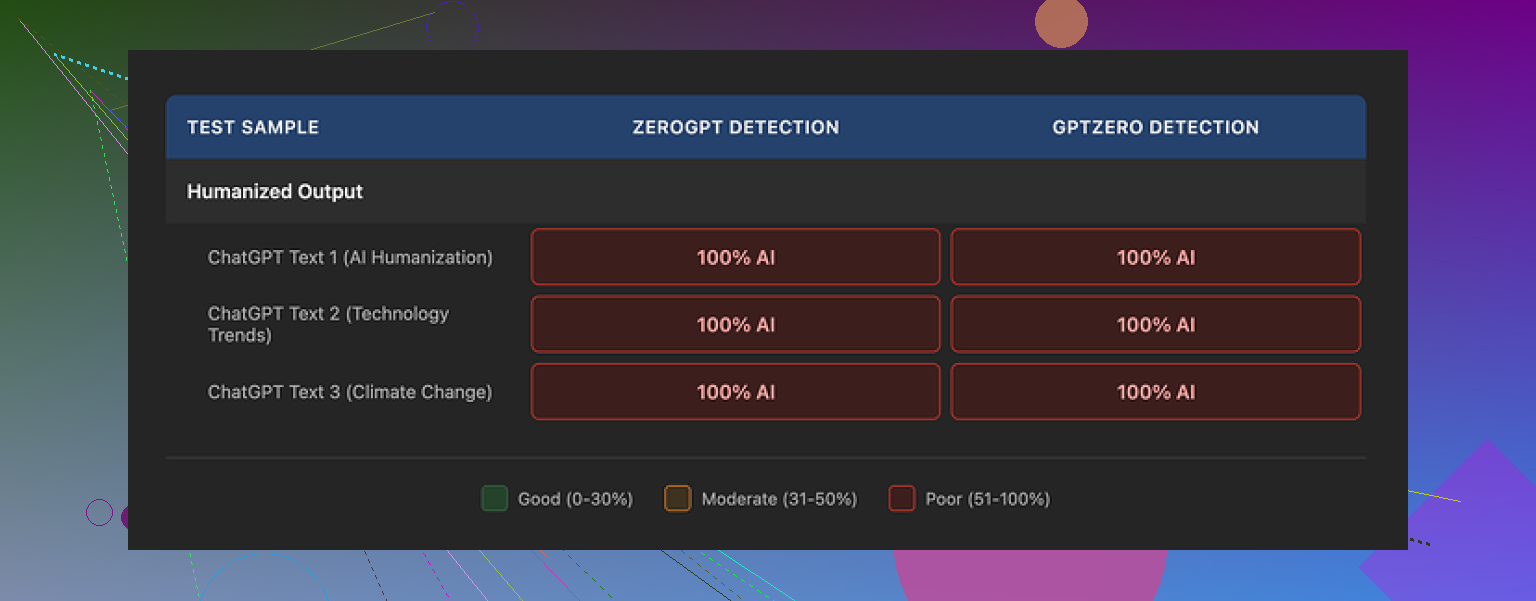
Ahrefs humanizer failing its own test

I fed it multiple chunks of AI text. Different lengths. Different styles. Some straight from GPT, some lightly edited by me.
Every single output showed up as 100% AI on GPTZero and ZeroGPT.
Not “partially AI.”
Not “mixed.”
Straight 100% AI, every time.
The weird part is the Ahrefs interface itself. Above the humanized result, it shows its own detection score. That score also said 100% AI on the content it had just “humanized.”
So the workflow looked like:
- Paste text.
- Click humanize.
- Get output that looks fine at a glance.
- Ahrefs’ own detector tells you that the output is still 100% AI.
At that point I sat there staring at the screen for a bit, because I did not expect a tool to argue with itself.
There is also this:
Quality of the text
If you ignore detection and only look at readability, the output is not terrible.
I would rate it around 7 out of 10:
- Grammar is clean.
- Sentences connect logically.
- It is easy enough to read.
Problem is, it still screams “AI” once you pay attention.
Stuff I kept seeing:
- Em dashes left in place, unchanged.
- Generic openers like “one of the most pressing global issues” sitting untouched at the top.
- Same kind of rhythm you see in raw GPT text, especially in intros.
So if you are trying to reduce AI fingerprints for detectors or for editors, this does not move the needle much.
Almost no control for the user
The only meaningful option you get is how many variants you want, up to five.
No:
- Tone control.
- Length control.
- “Keep keywords” option.
- “Preserve structure” option.
You can technically copy sentences from different variants, then manually stitch together one “best of” version. I tried that on two pieces.
Result:
- It took longer than it should.
- Detection scores still stayed high.
- It did not feel like a one click solution at all.
So you end up doing manual work on top of a tool that was supposed to remove manual work.
Pricing and data policy
The humanizer lives inside their Word Count platform.
The deal looks like this:
- Free tier gives access, but no commercial use allowed.
- Paid plan is $9.90 per month on annual billing.
- The subscription bundles:
- Humanizer
- Paraphraser
- Grammar checker
- AI detector
Two things that bothered me:
-
Submitted text may be used for AI model training.
If you care about client data, contracts, or unpublished drafts, you should pause here and think before pasting. -
They do not state how long humanized output is stored.
No clear retention policy. That is a red flag for some use cases.
If you treat it as a toy for personal experiments, fine. For agency work or anything sensitive, I would keep it away from client material.
Alternative that worked better for me
I tested a few tools side by side with the same base text.
Clever AI Humanizer performed noticeably better with detection in my runs and it did not cost anything at the time.
Link to the review and proof here:
I pushed the same snippets through:
- Raw GPT text
- Ahrefs humanized text
- Clever AI Humanizer output
On multiple detectors, Clever’s output tended to score lower on AI probability than Ahrefs’ output, which kept hitting that 100% AI wall.
If your goal is:
- Passing AI detectors,
- Getting text that feels less like a template,
- Spending less time manually rewriting,
then Ahrefs’ humanizer feels more like a half-finished add-on than a serious tool.
Where Ahrefs is strong is SEO data and link stuff. The humanizer does not match that level. At least not in the current state.
20 Likes
I had the same question you do, ran Ahrefs Humanizer through a bunch of tests for client content, and ended up dropping it.
My experience was a bit different from @mikeappsreviewer, so here is another data point.
What I tested
• Around 20 samples
• Mix of GPT‑4, Claude, and some hybrid text I had edited
• Lengths from 300 to 2,000 words
• Checked on: GPTZero, Originality.ai, Copyleaks, and a cheap API based detector
What happened
-
Detection scores
On average, raw AI text showed 80–100 percent AI.
After Ahrefs Humanizer, I usually saw a drop of about 10–25 percentage points on Originality.ai and Copyleaks.
GPTZero often stayed high, sometimes even went back to 100 percent.
So it did not “pass” detection, but it sometimes took content from “obviously AI” to “mixed”. -
Where it helped
• Fixing stiff phrasing in middle paragraphs, not intros.
• Smoothing transitions between sections.
• Cleaning up repetitive sentence patterns. -
Where it failed
• Hooks and conclusions stayed robotic. I had to rewrite those by hand.
• Detectors still flagged long-form posts, especially if the structure stayed the same.
• It repeated stock phrases like “on the other hand” or “one of the key factors”, which detectors and editors hate. -
Workflow that worked “okay” for me
If you still want to test it, this flow reduced flags the most in my runs:
• Step 1: Write or generate content in smaller chunks, 200–300 words per section.
• Step 2: Humanize only the most robotic parts, not everything.
• Step 3: Rewrite the first 2–3 sentences of the article manually. Add 1–2 specific anecdotes or numbers.
• Step 4: Swap generic phrases. Example, change “one of the most important factors” to something concrete like “the part most people ignore is X”.
• Step 5: Shorten some sentences, lengthen others. Detectors key on rhythmic patterns.
With this, I got some pieces down to 30–60 percent AI on Originality.ai and Copyleaks. GPTZero still stayed aggressive.
Pros I saw
• Fast way to get a second version of a paragraph.
• Grammar and flow improved, so it saved some editing time.
• Decent for non‑critical stuff like internal docs, low‑stakes blog posts, support articles.
Cons
• Not a “one click” solution for AI detection. You still need manual edits.
• Very little control. No real tone or structure control, so you must fix that yourself.
• Data policy is a risk if you work with NDAs or sensitive client stuff.
If your goal is:
• “I want text that sounds a bit less robotic so my editor spends less time,” it has some value.
• “I want to pass AI detectors for serious client work,” it is unreliable on its own.
What I would do in your place
• Keep your main process human first. Use AI tools for brainstorming or rough drafts.
• Use Ahrefs Humanizer, or any humanizer, only on small sections, not whole articles.
• Manually add: specific stories, dates, numbers, named tools, real opinions. Detectors struggle with concrete detail.
• Test with more than one detector, because results vary a lot.
Short version
Ahrefs Humanizer does more than simple paraphrasing in some spots, but it does not fix AI flags enough to rely on it. Treat it as a light editor, not as an AI detector bypass.
Short answer: if your main goal is beating AI detectors, Ahrefs Humanizer is, at best, a partial nudge, not a fix.
I had a similar arc to what @mikeappsreviewer and @sonhadordobosque described, but landed somewhere in between them.
What I noticed in repeated use:
1. It mostly reshuffles, it rarely “revoices”
It tends to:
- Swap synonyms
- Tweak sentence order
- Smooth some clunky bits
What it does not really do:
- Inject concrete detail, personal nuance, or opinion
- Change structure enough to confuse detectors on long pieces
So yeah, it’s more than a dumb paraphraser, but not by a huge margin.
2. Detectors: tiny gains that vanish on longer text
Without rehashing their step by step tests:
- Short paragraphs: sometimes I saw a modest drop on tools like Originality or Copyleaks, similar to what @sonhadordobosque said.
- Full articles: same pattern as @mikeappsreviewer, detection still slammed it as AI. It especially struggles when the outline is still very “blog template” style.
I actually disagree a bit with the idea that it is even a reliable “light editor” for detection purposes. It cleans language, sure, but clean, evenly structured language is exactly what some detectors look for. On a few tests, the more polished the text got, the more AI it looked.
3. Where it is mildly useful
If you insist on using it, I’d keep it to things like:
- Internal docs
- Product help text
- Rough drafts where you already plan to do a human pass
Basically: use it as a quick rephrase tool when you are too tired to rewrite a paragraph yourself. Expect to still do real editing after.
4. Where it is a bad idea
- Anything with client NDAs or sensitive material, because of the training and retention question.
- Work where “this must not look AI” is a hard requirement. You are better off rewriting 20 percent of the piece by hand than running 100 percent through a humanizer.
- Stuff where you need style control. Almost no knobs to turn here.
5. If your objective is lower AI flags
Instead of pushing everything through Ahrefs and hoping for the best, I’d focus on the parts humanizers basically can’t fake well:
- Add specifics: real tools, dates, small personal opinions, “this part usually goes wrong when X happens”.
- Intros and conclusions: write those fully by hand. Detectors and humans both key on them.
- Break the pattern: mix sentence lengths, throw in a weird but relevant example, remove formulaic “on the other hand / in conclusion / one of the most important things” phrasing.
That kind of editing has moved the needle way more for me than any humanizer, including Ahrefs, Clever, or whichever new one pops up this week.
Bottom line
If you treat Ahrefs Humanizer as:
- A magic AI detection cloaking device: it will disappoint you.
- A slightly smarter paraphraser bundled into a cheap toolset: it is fine, just not special.
You’re not imagining it if it feels like it is mostly rephrasing without actually fixing your AI flags. That is pretty much what it does.