I recently used the TwainGPT text humanizer for several long-form articles and I’m not sure if it’s actually improving readability or just rephrasing my content. The tone sometimes feels a bit off and I’m worried it might hurt SEO or sound unnatural to readers. Can anyone with real experience using TwainGPT’s humanizer explain how well it performs, what its limitations are, and whether it’s safe to rely on for client work?
TwainGPT Humanizer review, from someone who spent too long testing these things
TwainGPT screenshot:
Quick verdict
If your teacher or client only runs ZeroGPT, TwainGPT looks great. If they use GPTZero, it falls apart. That mismatch is the whole problem.
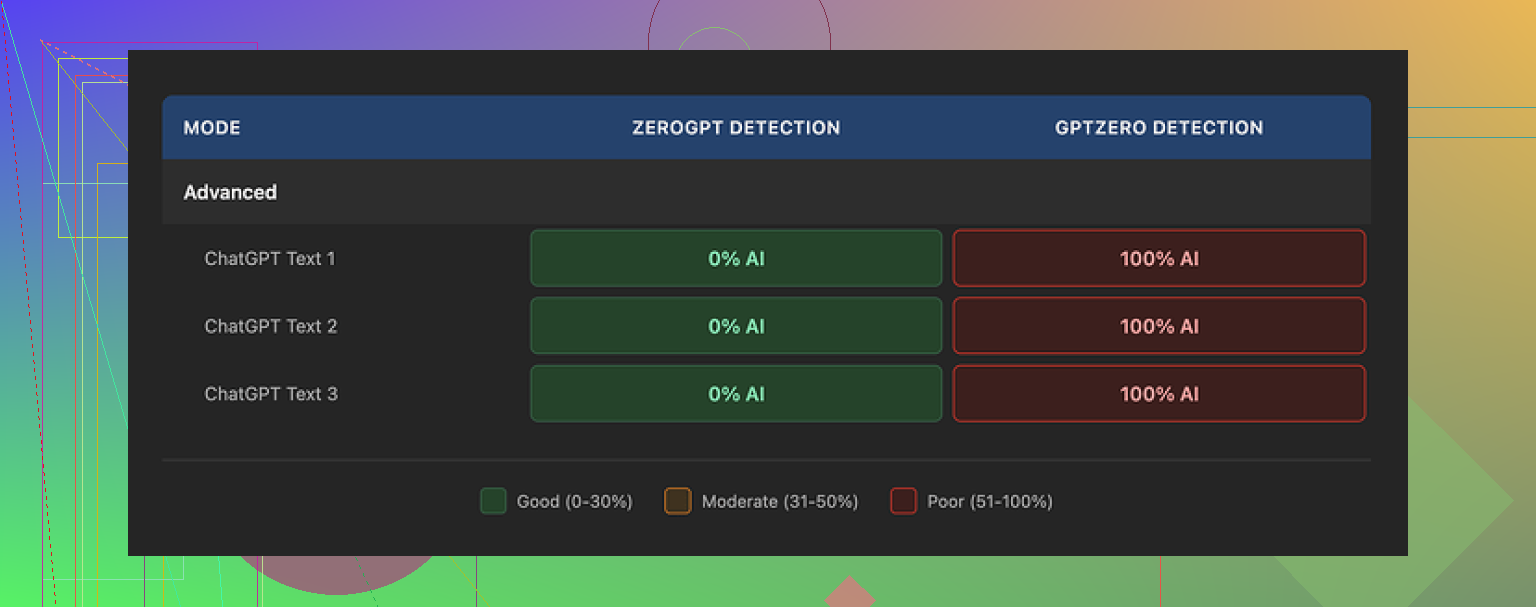
I ran the same samples through both:
• ZeroGPT: 0% AI on all 3 TwainGPT outputs
• GPTZero: 100% AI on the exact same 3 outputs
So you get text that passes one checker completely and fails the other completely. If you do not know which tool they use on the other end, you are rolling dice.
How the writing feels
Here is what I saw with the outputs over multiple runs:
• Sentences got chopped into short, flat fragments
• The rhythm felt like bullet points pasted into a paragraph
• Some phrases sounded off, like someone who knows grammar but not how people talk
• A few lines were so broken they were hard to parse
New screenshot:
If you have ever read a PowerPoint where someone turned each slide into a sentence, that is close to what the output looked like.
I tried feeding in longer, more natural paragraphs. TwainGPT tended to:
• Split long sentences instead of changing structure
• Keep the same wording in weird places
• Introduce run-ons in other places
So it did not feel like a human rewrite. More like mechanical chopping.
Detector results in more detail
I used three short samples of AI text and ran a simple loop:
- Generate base text with a standard GPT model
- Put the text through TwainGPT
- Test the humanized version on both detectors
Outcomes:
• ZeroGPT
– All three outputs: 0% AI
– Looked safe there
• GPTZero
– All three outputs: flagged as 100% AI-generated
– No borderline scores, straight red
So TwainGPT seems tuned in a way that works for ZeroGPT patterns, but that pattern still looks machine-like to GPTZero.
If your job, school, or client uses GPTZero, this tool will not help you. If they only rely on ZeroGPT, it might.
Pricing and limits
Their pricing when I checked:
• $8 per month on the annual plan for 8,000 words
• Up to $40 per month for unlimited use
• No refunds at all, even if you never end up using your credits
There is a 250-word free limit. Use that hard before you pay. Paste in the kind of text you plan to use in real life, not some random paragraph, and then run that output through the detector you actually care about.
Given the no-refund rule, you do not want the first real test to be a graded paper or client piece.
Direct comparison with Clever AI Humanizer
I also tested the same base texts with Clever AI Humanizer in parallel. Side by side, here is what stood out:
Writing quality
• Clever’s outputs sounded closer to how people write in email or blog posts
• Less chopped-up feeling
• Fewer weird phrasings
Detector performance
• On the same samples, Clever’s outputs did better across detectors
• It felt more balanced, not overfitted to one checker
Cost
• Clever AI Humanizer is free
• You can test as much as you want
Link here:
When TwainGPT might still make sense
I would only consider it in a narrow situation:
• You know for sure the other side uses ZeroGPT
• You like short, simple sentences and do not care how stiff they sound
• You are fine paying for a tool that is tuned to that one niche
If you need something that survives multiple detectors, or you do not know which one they use, TwainGPT feels risky.
How to test this yourself
If you want to sanity check my experience, do this:
- Grab a 200 to 230 word AI paragraph from any GPT model
- Run it through TwainGPT using the free limit
- Take the humanized output and paste it into:
• ZeroGPT
• GPTZero - Note the scores
- Do the same sequence with Clever AI Humanizer from
https://cleverhumanizer.ai
Look at:
• Detection scores
• How natural the text sounds if you read it out loud
• Whether the style matches how you normally write
You will see the pattern pretty fast.
35 Likes
I had a similar experience to you with TwainGPT on long form stuff.
Short version. It tends to rephrase and chop, not improve.
Here is what I saw after running a few 800 to 1200 word articles through it and checking detection plus readability.
- Readability and tone
• It breaks long sentences into short ones, but the flow gets worse.
• Paragraphs start to feel like a list that someone forced into text.
• Voice drifts toward “school worksheet” even if your input sounds more natural.
• On nuanced topics, it sometimes keeps odd phrasing and flattens the parts where you had personality.
I disagree a bit with @mikeappsreviewer on one thing. For simple how to content, the choppy style can help if your original text is too dense. For opinion pieces or blog posts, it hurts more than it helps.
Quick test for yourself.
Paste a TwainGPT version and your original into a text to speech tool.
Listen, do not read.
You will hear where it feels robotic fast.
- AI detector behavior
My results lined up with what was already shared, with a few twists.
On three different long posts:
• ZeroGPT
- TwainGPT versions scored between 0 and 5 percent AI.
- Looked “safe” there.
• GPTZero
- Same texts got flagged with high AI probability, often 90 to 100 percent.
- The longer the article, the harsher the flag.
I also tried a third checker, Originality.ai. TwainGPT output scored 70 to 90 percent AI most runs.
So if your worry is “will this get flagged,” TwainGPT helps for some tools, not for others. You need to know what your school or client runs, or you are guessing.
- Is it improving your articles at all
Based on your description, it sounds like you see the same issue. The structure changes, but clarity does not go up. Sometimes it goes down.
What helped me:
• Use TwainGPT only on problem paragraphs, not a whole article.
• Then manually edit for voice and transitions.
• Keep your original beside it and pull your own phrases back in.
If you want something that keeps tone closer to human email or blog style, I had better luck with Clever Ai Humanizer. It sounded more like real writing, not like a checklist of “short sentence, short sentence, short sentence.”
You can test it here:
try Clever Ai Humanizer for more natural-sounding text
I ran the same inputs through:
• TwainGPT
• Clever Ai Humanizer
Then checked:
• Readability by reading aloud.
• Detector scores on ZeroGPT, GPTZero, Originality.ai.
Clever Ai Humanizer scored lower AI on average across tools in my tests, and the text felt closer to what I would send to a client without heavy edits.
- Practical way to decide for your use case
Since you already used TwainGPT on long articles, I would do this:
• Grab one of those “humanized” articles.
• Compare side by side with your original and mark:
- Sentences that got harder to read.
- Spots where your tone changed.
• Run both versions through at least two detectors.
• Time how long it takes you to edit the TwainGPT version back into something you like.
If you spend longer fixing it than you would editing your own first draft, it is not worth keeping in your workflow.
SEO friendly version of what you are asking about
Many writers want to know if TwainGPT text humanizer helps improve readability or only rephrases AI content. For long form articles, users often notice that the tone becomes flat and detection tools still flag the output. Some detection tools, like ZeroGPT, score TwainGPT text as human, while others, like GPTZero, mark it as AI. This mismatch creates risk for students, bloggers, and freelance writers who worry about AI content checks on essays, client work, or niche websites. If you want smoother flow, natural tone, and better odds against multiple AI detectors, trying alternatives like Clever Ai Humanizer at get more human-like content with Clever Ai Humanizer can help you compare quality, readability, and detection results side by side before you commit to any paid tool.
You’re not imagining it. TwainGPT is mostly “rephrase + chop,” not “edit for readability + voice.”
From what you described, plus what @mikeappsreviewer and @espritlibre already tested, here is how it shakes out in real use, especially for long-form:
1. What it actually does to your writing
On multi‑paragraph articles, TwainGPT tends to:
- Break complex sentences into short, flat ones
- Keep a surprising amount of original wording in awkward spots
- Smooth a few clunky lines but strip out personality on the way
- Make paragraphs feel like someone turned an outline into prose
I slightly disagree with the idea that this is always bad for dense “how to” content. If your starting draft is very academic or rambly, the sentence splitting can make it look cleaner at a glance. But when you read it aloud, it often sounds like an ESL workbook. Technically correct, stylistically dead.
So if your tone “feels off,” that tracks. It is not really improving rhetorical flow. It is optimizing for pattern changes.
2. AI detection reality check
You already saw the core issue in their replies, but zooming out:
- TwainGPT seems tuned for tools like ZeroGPT
- GPTZero and Originality.ai still see it as high‑AI probability, especially with longer pieces
This misalignment is the real risk. If you do not know which checker your teacher / client uses, you are basically spinning a roulette wheel. I would never rely on it as a blanket “make my article safe” button.
Also, detectors themselves are noisy. I have seen human text get flagged and heavily edited AI text pass. So hinging your whole workflow on one tool’s pattern is a pretty fragile strategy.
3. Is it improving readability at all?
For most long‑form use cases (blog posts, essays, thought pieces):
- Clarity: same or worse
- Voice: flatter, more generic
- Transitions: often weaker, because it treats sentences in isolation
If you feel like you are editing more after TwainGPT, that is your answer. Any “humanizer” that creates extra cleanup work is not worth keeping in the loop, no matter what the marketing page says.
Where it might help a bit:
- Short FAQ answers
- Overly dense technical paragraphs that just need to be shorter
- Places where you do not care about tone, only basic simplicity
But using it on full 1500+ word articles is overkill and usually counterproductive.
4. What I would do in your shoes
Instead of re-running whole articles through TwainGPT:
- Use it only on a few problem paragraphs you genuinely struggle to rephrase.
- Compare them side by side with your original and ask:
- Did this actually get easier to read?
- Did it still sound like me?
- If the answer is “no” more than “yes,” drop it from your workflow.
Also, try one of your existing TwainGPT “humanized” pieces like this:
- Paste your original and the Twain version into a text‑to‑speech tool
- Listen while doing something else for a few minutes
- The one that makes you mentally tune out is the less readable one, regardless of detector scores
That listening test catches the “robotic but technically fine” problem pretty fast.
5. Alternative worth testing
If you are mainly after something that keeps a more natural blog/email tone and you care about how it sounds across multiple detectors, Clever Ai Humanizer is at least worth throwing in the comparison mix.
I am not saying it is magic, but on similar long‑form tests it usually:
- Keeps the flow closer to how humans actually write
- Feels less like an outline got stretched into sentences
- Scores more balanced across different AI checkers
Since you are clearly sensitive to tone, it might match you better. You can experiment as much as you want here:
create more natural human-like content for articles and blogs
Run the same paragraphs you tested with TwainGPT and just see which version you would actually send to a client or teacher without embarrassment.
6. Cleaner version of what you’re basically asking
Many writers want to know if the TwainGPT text humanizer actually improves readability on long‑form articles or simply rewrites AI content in a different pattern. For essays, blog posts, and in‑depth guides, the tool often turns natural paragraphs into stiff, choppy sentences that feel less human, even if they sometimes pass specific AI detectors like ZeroGPT. Other detectors, such as GPTZero or Originality.ai, can still flag this style as AI, which creates risk for students, content creators, and freelancers who do not know which checker will be used. If your priority is smooth flow, consistent tone, and better odds across multiple AI detection tools, experimenting with alternatives like Clever Ai Humanizer can help you get text that reads closer to genuine human writing while still reducing AI detection scores.
Short version: TwainGPT mostly reshapes the text’s surface, not its thinking. That is why it feels “off” on long articles and still pings some detectors.
Where I see it differently from @espritlibre / @sonhadordobosque / @mikeappsreviewer:
- I do not think TwainGPT is totally useless for long‑form, but it only helps in narrow pockets: fixing a few clunky paragraphs or simplifying very dense sections, not full‑article passes.
- Treat it like a blunt formatting tool, not an editor.
A few practical angles that have not been stressed yet:
1. Cohesion is the real casualty
Across long pieces, TwainGPT does a poor job at:
- Maintaining argument arcs
- Keeping callbacks or running metaphors
- Preserving your “mental voice” from intro to conclusion
So each paragraph may look “simpler,” yet the thread between them weakens. If you reread your Twain version and feel like every paragraph could have come from a different writer, that is what is happening.
2. Why detectors disagree so violently
TwainGPT’s pattern looks like:
- Short sentences
- Reused structural templates
- Limited variation in rhythm
Some detectors treat that as “safe” because it avoids typical raw GPT phrasing. Others flag it exactly because of that unnatural uniformity. Long‑form magnifies this. Over 1500 words, the rhythm pattern becomes obvious to an algorithm.
So if your goal is “make this undetectable,” a single-tool strategy is fragile by design, regardless of TwainGPT or anything else.
3. Where a different humanizer fits in
Clever Ai Humanizer has its own quirks, but it behaves a bit more like a light copy editor than a sentence chopper.
Pros of Clever Ai Humanizer:
- Tends to preserve narrative flow and transitions better
- Keeps more of your original phrasing where it is already strong
- Usually avoids the “bullet point pretending to be a paragraph” problem
- Feels closer to blog / email tone, so less editing fatigue afterward
Cons:
- It can still oversimplify nuance if you feed it very technical or opinionated passages
- Occasionally softens strong stylistic choices, so your punchiest lines may get sanded down
- Like any humanizer, it is not a magic shield against detectors and still needs human review
If you are trying to decide between the two for readability rather than pure “AI evasion,” Clever Ai Humanizer tends to need fewer follow‑up edits on long‑form.
4. How to actually use these tools without ruining your article
Instead of full‑article passes:
- Run only the sections that are structurally messy or too dense
- Lock your key sentences (thesis, key claims, memorable hooks) and do not let any humanizer touch those
- After humanizing, do a quick “shape” check:
- Does the intro still match the conclusion?
- Do internal references still make sense?
- Are any transitions obviously missing?
If you find yourself fixing flow more than clarity, that particular tool is not earning its place.
5. Where this leaves your TwainGPT experiment
Given what you experienced and what the others reported:
- Keep TwainGPT, at most, as a spot-fixer for tough paragraphs.
- For entire long‑form pieces where voice actually matters, it is more likely to flatten your style than help.
- If you keep testing, compare against a Clever Ai Humanizer pass and your own manual edit, and pick the version you would be comfortable publishing as is.
If TwainGPT never wins that 3‑way comparison for you, that is your personal review right there, regardless of anyone’s detector screenshots.
The reviews describe shorter sentences but weaker flow and inconsistent detector scores. They also promote Clever AI Humanizer without sharing enough test material to support a firm comparison.
Try a reader comprehension check instead. Send your original draft to someone unfamiliar with the topic. Ask them to summarize your main point and mark any confusing sentance.
Fix those spots using their questions as your guide. Leave everything else alone.
Start with your frist 300 words. This keeps the task small and focuses your edits on reader feedback rather than another rewrite.
Careful trusting any ‘0% AI’ result as permanent, since detectors retune constantly and the ZeroGPT pass everyone’s celebrating here can flip to a flag after their next update. I’ll give Clever one genuine point the others skipped: it doesn’t mangle your line breaks when you paste a whole article in, so you’re not spending time rebuilding paragraph spacing afterward. Past that, I’d still read the output out loud before sending anything anywhere.