I’m trying to clear the Twitter/X cache on my iPhone because the app is taking up a lot of storage and running slowly. Before I do it, I want to know if clearing the cache will log me out, delete drafts, or remove any saved settings. Has anyone done this recently on iOS?
The quickest safe thing to try is clearing X’s own storage from inside the app. It won’t delete your posts, bookmarks, followers, or accounts. That stuff lives on X’s servers. You’re only removing temporary files your phone saved while you were scrolling.
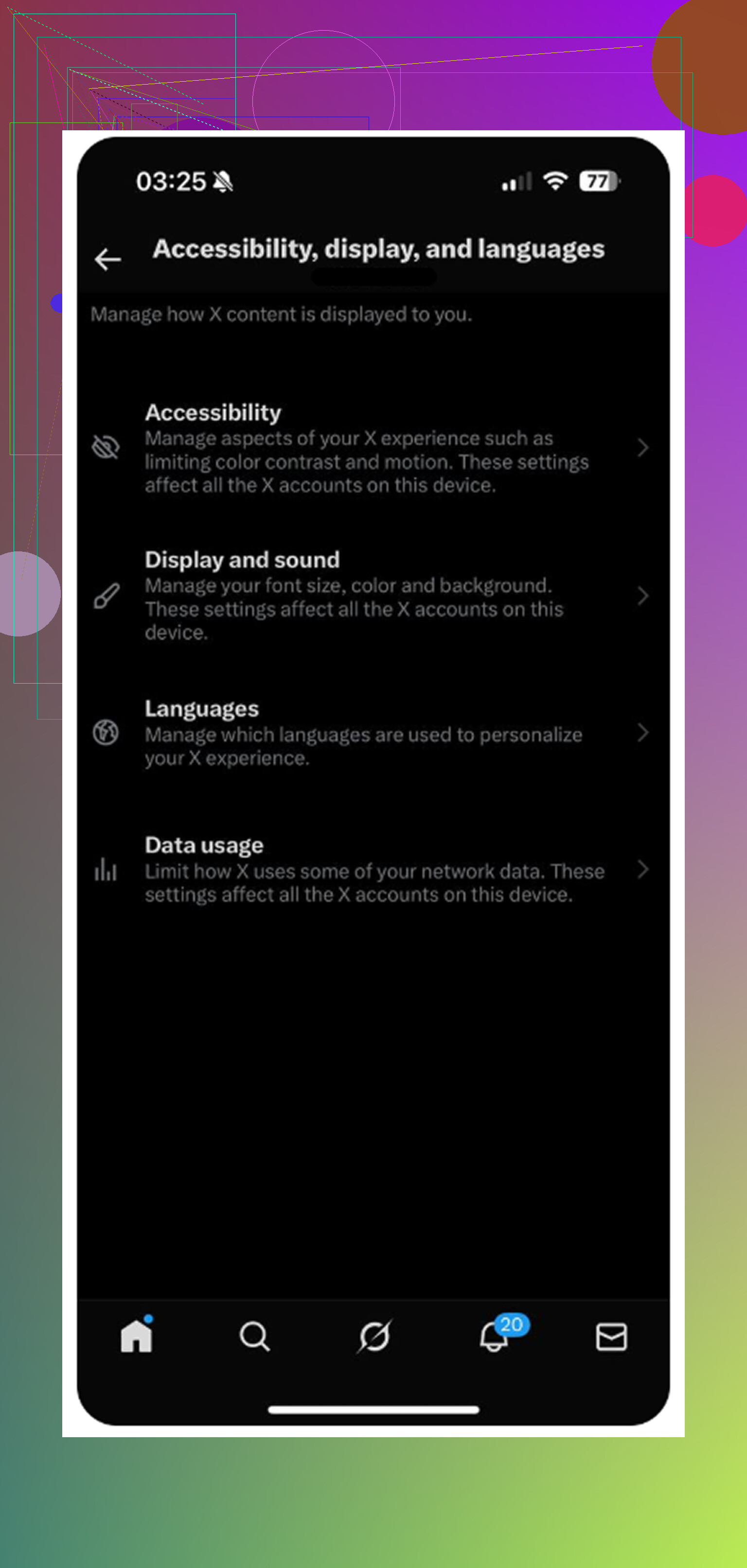
The setting is kind of buried. Open X, tap your profile icon in the top-left, then go to Settings and Support > Settings and privacy > Accessibility, display, and languages > Data usage. Scroll to the bottom and look for Storage.
You’ll see two different storage areas there:
- Media storage is the cache for images, GIFs, video previews, and other media X has loaded while you browse. If you tap Clear media storage, it clears those temporary files and does not log you out.
- Web storage is for pages and cookies from links you opened in X’s in-app browser. Clear web page storage usually just removes cached site data. Clear all web storage also removes cookies, so that one can log you out.
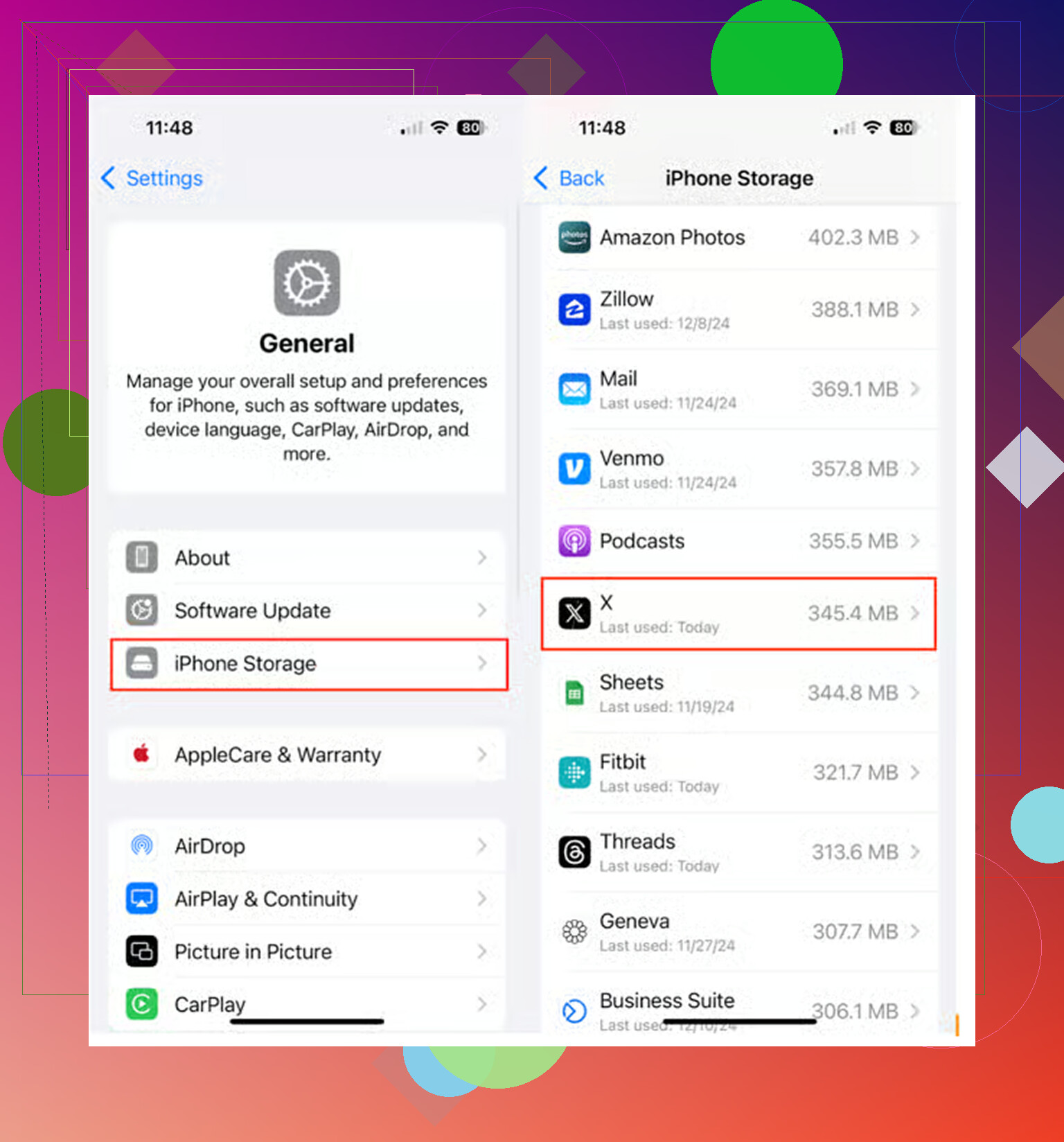
If X is showing some ridiculous number in iPhone Storage, like 10GB or 20GB, the in-app buttons may not be enough. In that case, the better move is using iOS offload instead of deleting the app.
Go to iPhone Settings > General > iPhone Storage > X, then tap Offload App. Don’t hit delete. Offloading removes the app itself but keeps the important local data, including your login info in most cases. Then tap Reinstall App. That usually clears out the huge cached junk much better than the regular X storage buttons, while still keeping you signed in.
That said, clearing X’s cache only goes so far. I had the same moment where I cleared it, got about 2GB back, and my phone still felt slow. The real problem was my photo library, not Twitter/X. Tons of old screenshots, duplicate-looking shots, and random videos were eating way more space than the app cache.
A lot of cleaner apps are annoying about this. They’ll scan your phone for free, show you the mess, and then ask for a weekly subscription before you can actually delete anything.
The one I had better luck with was Clever Cleaner. The main reason is simple: it’s actually free. No ads, no paywall when you try to delete, and no weird subscription trap.
The Heavies tab is useful because it sorts your photos and videos by file size, so you can immediately see what’s taking up the most room. It also shows the exact size of screenshots, which makes it easier to decide what’s worth deleting.
The Similars tab is probably the best part. It groups near-duplicate photos together, like when you took ten versions of the same shot, and helps you keep the best one. It also processes everything on your device, so your personal photos aren’t being uploaded somewhere else.
So yes, clear the X cache if the app is buggy or you need to claw back some space. But if your iPhone is stuck in “Storage Almost Full” territory, check your photos too. Cleaning up the media library will usually make a much bigger difference than clearing one app’s cache.
9 Likes
Check your drafts before you do anything in iPhone Storage. Clearing media cache inside X should not log you out or remove drafts, but deleting the app can wipe local stuff like drafts, so offload is the safer reset if the cache buttons don’t free enough space.
Don’t use “Delete App” as your first fix unless you’re fine with signing back in and possibly losing anything that only exists on the phone. Clearing media cache inside X is the low-risk option and shouldn’t touch your account, posts, bookmarks, or login session. The annoying gray area is drafts, because drafts are local enough that I’d copy anything important into Notes before doing storage cleanup. Offload is usually safer than delete, but I’d still make sure you know your password and have access to your 2FA method before poking around. Cache cleanup is supposed to be boring, but getting locked out because your old phone number is still on the account is the real headache.
Clearing X’s media cache is not the same as deleting the app, so no, it normally should not log you out. The annoying bit is that iPhone Storage may not update right away, and X will rebuild that cache as soon as you start scrolling again. Drafts are the only thing I’d treat as fragile, so copy anything important before doing anything beyond the in-app cache clear.
Honest take: the media cache refills within a day or two of normal scrolling, so clearing it is a temporary fix at best. If storage is your actual problem, offload once and then look at photos and video like @mikeappsreviewer said, because that’s where the real space usually hides. Cache buttons are for a laggy app, not for freeing space long term.