I’m thinking about using Decopy AI Humanizer, but I’ve seen mixed feedback and can’t tell what’s real. I need help figuring out if it actually makes AI-generated writing sound human, avoid detection, and stay readable without ruining the original meaning. If you’ve used it, I’d really appreciate an honest Decopy AI Humanizer review before I spend money on it.
Decopy AI Humanizer
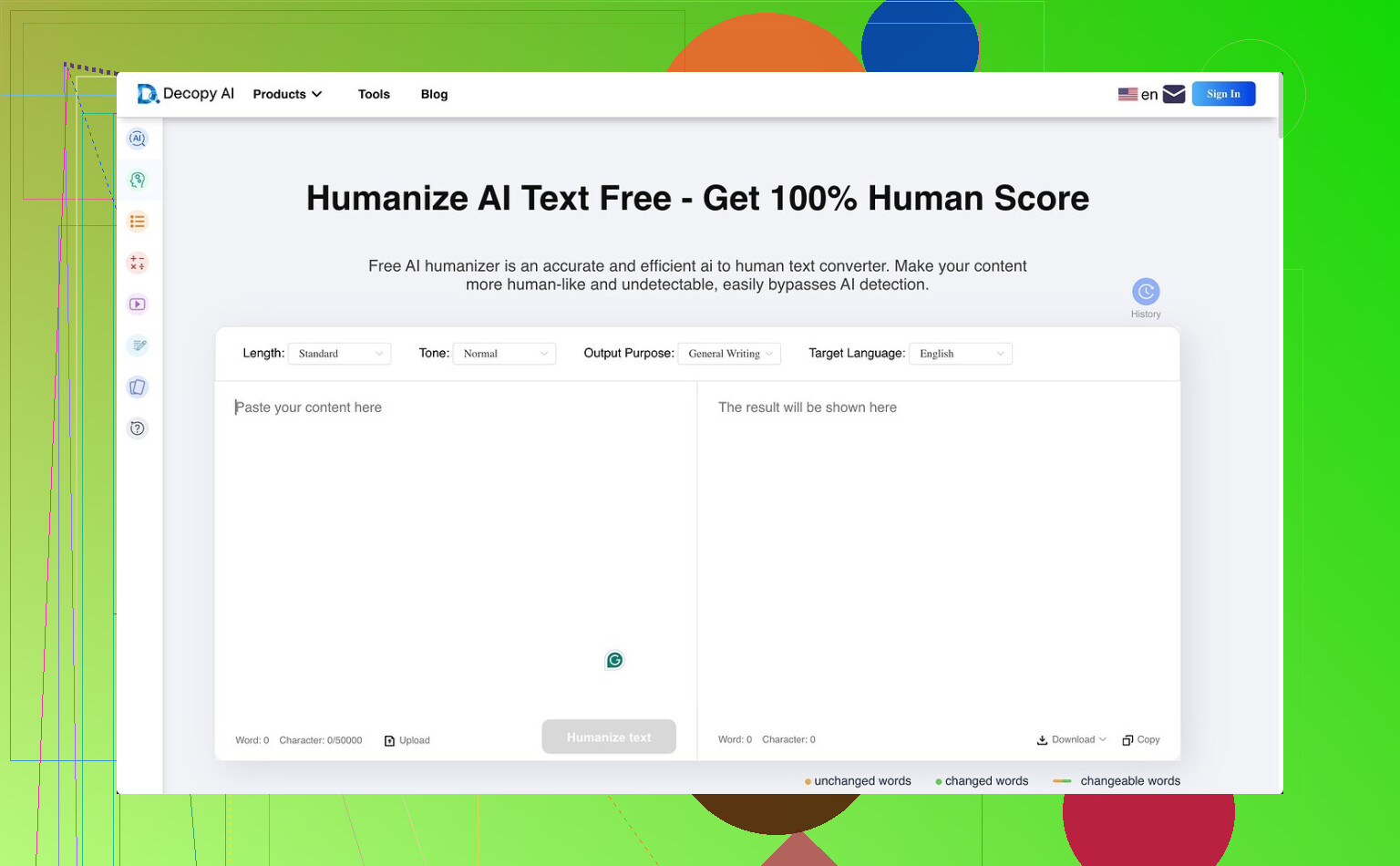
I tried Decopy AI Humanizer because the free tier looked kind of wild on paper. You get 500 free runs, up to 50,000 characters in one go, eight tone options, nine purpose presets, and a sentence rewrite button for fixing one line at a time. So yeah, feature list looks stacked.
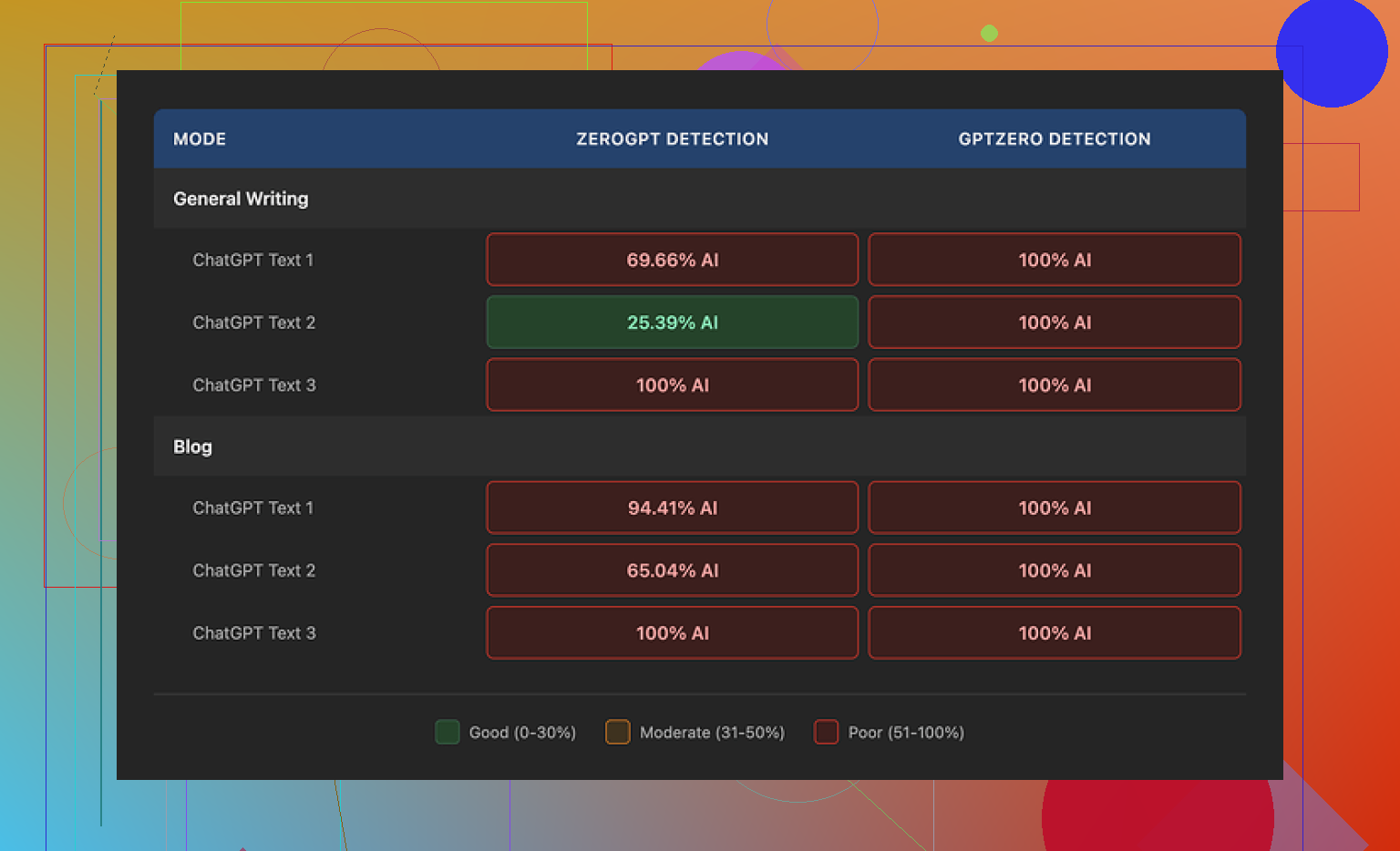
The problem showed up fast. In my tests, the output still read like machine-cleaned text. GPTZero flagged every result as 100 percent AI in both General Writing and Blog mode. ZeroGPT bounced around more, roughly 25 percent up to 100 percent depending on the sample, but it still was not what I’d call reliable if your goal is avoiding AI flags.
Where it did better, grammar. I did not see it wreck sentence structure or toss in weird mistakes the way some other tools do. On plain output quality, I’d put Blog mode around 7 out of 10, and General Writing a bit higher at 7.5 out of 10. The issue is the style gets flattened. Blog mode felt like it was aiming at a kid, not a normal reader. General Writing was less goofy, though I still got phrasing like ‘digital stuff’ and ‘totally changing tech,’ which felt off and kind of cheap. One small plus, it usually kept close to the original length, so it did not bloat the text.
I also checked the privacy side. The policy states a three month retention window and says it follows GDPR and CCPA. That part is clear enough. What I did not find was a plain explanation of what happens to the text you paste in for rewriting. For me, that gap matters more than the compliance badge.
After running side by side tests, Clever AI Humanizer gave stronger humanization in the same kind of controlled checks, and it did not cost me anything.
26 Likes
I used Decopy for a few batches of product copy and a school-style explainer. My take is a bit split.
It keeps text readable better than a lot of cheap humanizers. It did not trash grammar. It also stayed close to the source, which helps if you need the same facts and structure. I agree with @mikeappsreviewer on that part.
Where I disagree a little, the tone presets are not useless. They do shift wording enough to matter. The issue is the shifts feel surface-level. You get safer wording, simpler phrasing, and some sentence variation, but not much real voice. After 2 or 3 paragraphs, the pattern starts to show.
For AI detection, I would not trust it. I saw mixed detector scores too. One sample dropped a lot in one checker, then got flagged hard in another. If your goal is passing detectors, Decopy feels shaky.
If your goal is readable cleanup, it’s decent. If your goal is human-sounding output with a natural rhythm, I’d pass. You still need manual edits. Add specifics, cut filler, change sentence lengths, and fix corny word choices. That part takes tiem, but it works better than one-click rewriting.
I’d split it like this:
If you want Decopy to make text cleaner, it’s pretty usable. If you want it to make text genuinely human, ehhh, not really. That’s where I land after seeing similar results to @mikeappsreviewer and @viajantedoceu, but I’m a little less harsh on readability. It usually doesn’t butcher the draft, which is already more than I can say for a lot of these tools.
My issue is the voice. It rewrites words, but not thought patterns. So the text can look different while still feeling oddly synthetic. That’s why detectors can still light up. People focus too much on ‘did the score go down’ and not enough on ‘does this sound like an actual person with a point of view?’
Also, detector-proof claims are kinda a trap in general. Today one checker says fine, tommorow another says 98% AI. I would not buy Decopy for that reason alone.
Where I slightly disagree with the others: for boring utilitarian stuff, product blurbs, simple explainers, rough drafts, Decopy is not useless. It’s just not magic. You’ll still need manual edits, and probly more than the marketing suggests.
Short version:
- readability: decent
- human feel: mid
- detector avoidance: unreliable
- worth paying for: only if you need fast cleanup, not stealth
My read is slightly different from @viajantedoceu, @andarilhonoturno, and @mikeappsreviewer. I think Decopy AI Humanizer is not great at sounding human, but it is somewhat useful as a low-risk rewriter when you do not want the draft mangled.
Pros
- keeps structure and facts mostly intact
- readability is usually fine
- grammar holds up better than many spin-style tools
- presets can help soften stiff AI wording a little
Cons
- “human” voice is thin and repetitive
- detector results are inconsistent
- rhythm still feels synthetic over longer sections
- privacy details around pasted content could be clearer
So if you want stealth, I would not trust it. If you want cleanup, it is serviceable. That is the key distinction.
Where I disagree a bit with the harsher takes: for ecommerce text, FAQs, support blurbs, and basic summaries, Decopy AI Humanizer can save time. Where I agree with them: it does not create real personality. You still need to inject specifics, opinion, and uneven sentence flow by hand.
My verdict: decent editor, weak humanizer, unreliable detector dodge.
Your review draws a useful line: Decopy works better as a cleanup tool than a detector workaround. The readable output and preserved structure help, but repeated phrasing weakens longer text.
A simpler option is voice rewriting. Read the source once, hide it, then explain the point aloud using your phone’s dictation. Clean the transcript and verify facts. Your natural pauses, word choices, and emphasis create stronger voice without presets. For example, turn a 500-word draft into a two-minute spoken explanation. This feels less robotic and takes less tiem than repeated detector tests.
Keeping the structure and length intact isn’t the win everyone here is calling it. That’s actually the reason the output keeps reading like a machine. AI detectors don’t care much about your word choices. They react to sentence rhythm, predictable clause order, and how evenly the sentences are spaced. If a tool preserves the original skeleton and just swaps vocabulary on top, you get exactly what @andarilhonoturno described: different words, same thought pattern. That’s not a small flaw. It’s the whole ballgame.
So I’d push back gently on the ‘decent cleanup tool’ consensus. Cleanup is fine, sure, but if the draft was already AI and you run it through something that keeps the paragraph shapes intact, you haven’t changed the thing that gets flagged. You’ve just made it read smoother while staying synthetic underneath. @viajantedoceu noticing the pattern show up after two or three paragraphs is the same problem from a different seat.
On the detector angle, I mostly agree it’s unreliable, but for a slightly different reason than the thread gives. It’s not that Decopy is uniquely bad. It’s that GPTZero, ZeroGPT, and the rest disagree with each other constantly on the same text, so a single ‘100 percent AI’ screenshot tells you almost nothing. If you must test, run the same sample through three checkers and look at the spread, not one number. One flag on one tool is noise.
The dictation idea from @bytecraft is the strongest thing posted so far, and it works because it breaks the original structure instead of decorating it. One caveat though. Phone transcription drops punctuation logic and mangles anything technical, names, numbers, product terms. So budget time to fix the transcript, and read your source twice before you hide it or you’ll leave out half the facts. It’s slower than a one-click rewrite, but it’s the only method in this thread that actually touches the part detectors read.
If you just need product blurbs and FAQs cleaned up fast, Decopy is fine and I wouldn’t overthink it. If the goal is text that reads like a person wrote it, no rewriter that respects your original structure is going to get you there, and that includes the one in the first reply.