I accidentally formatted my USB drive before backing up important photos and work files, and now everything is gone. I’m looking for advice on whether formatted USB drive file recovery is still possible and which recovery methods or tools actually work.
Yeah, this is a rough one. I’ve seen people format a USB stick, assume everything is dead on the spot, and then make it worse by using the drive again. Don’t do tht part.
The main thing is the type of format.
If it was a Quick Format, your odds are often decent. That type usually finishes fast because it removes the file system map, not the file data itself. In plain terms, the drive forgets where the files were, but the raw data often still sits there until new stuff lands on top of it.
If it was a Full Format, recovery gets ugly fast. A full format writes over the storage, so normal recovery software usually won’t pull anything useful back.
Also, I’d ignore any site claiming it can “unformat” a flash drive. That’s not how this works. The format process isn’t reversed. Recovery apps scan for leftover file data and try to rebuild files from what’s still present. If the bytes are untouched, you might get a lot back. If they’ve been overwritten, you won’t.
First step, stop using the USB drive now. Don’t copy anything onto it. Don’t format it again. Don’t run CHKDSK or other repair tools. Every write cuts into your chances, and once old data gets replaced, it’s done.
If I were in your spot, I’d move straight to a recovery app. I’ve had decent results with Disk Drill. It’s one of the easier ones if you haven’t done file recovery before.
What I’d do:
- Install Disk Drill on your computer’s internal drive, not on the USB stick.
- Plug in the formatted USB.
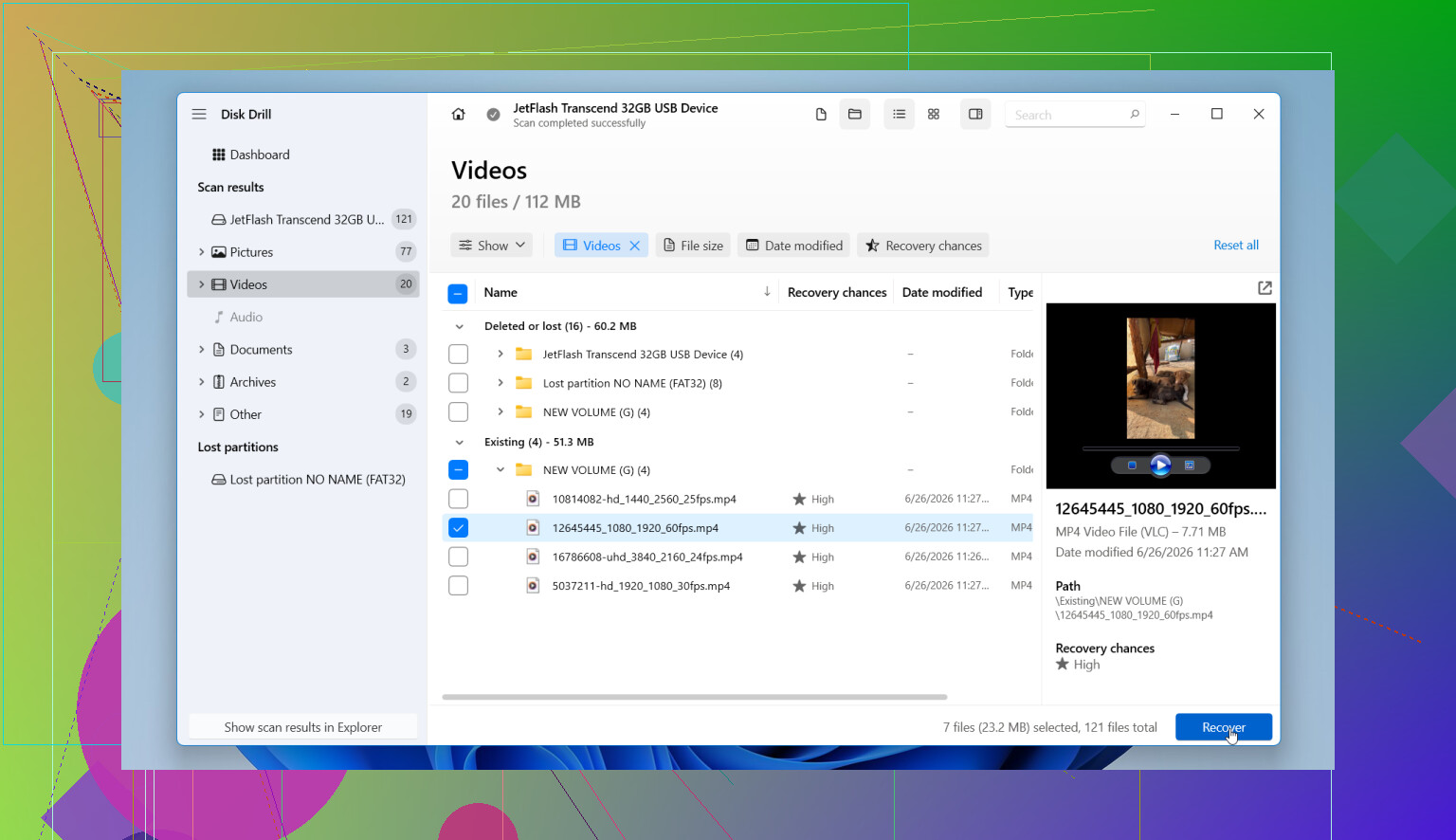
- Open Disk Drill and pick the flash drive from the device list.
- Click Search for Lost Data. If it asks for a scan type, pick Universal Scan. That tends to work well on formatted USB drives.
- Let the scan run all the way. You can look through results early, but I’d wait till it finishes. I’ve seen extra files show up near the end.
- Preview what it finds. If a photo opens, a document renders, or a video plays in preview, that’s a solid sign.
- Recover the files to a different drive. Don’t put them back on the same USB.
One part I’d pay attention to is the disk image option. Disk Drill lets you make a byte-for-byte image of the flash drive. If the USB is disconnecting, throwing read errors, or acting flaky, image it first and scan the image file instead. I’ve had to do this once on an old stick thta kept vanishing mid-scan, and it saved the recovery attempt.
If the recovered files come back with random names or missing folders, that’s common after formatting. Annoying, yes. Fatal, no. What matters more is whether the file contents still open.
So, yes, formatted USB recovery is often possible, mostly after a quick format. Your best move is simple. Leave the drive alone, scan it soon, and save recovered files somewhere else. Waiting usually makes the outcome worse.
10 Likes
Yes, people do recover files after formatting a USB drive. I’ve done it once with photos and a pile of PDFs. The result depended on one thing, how much I used the drive after the format. If you formatted it and stopped right there, your odds are way better.
I agree with @mikeappsreviewer on stopping all use. I’d add one thing. Check Disk Management first. Sometimes the files are not gone in the way you think. If the USB shows the wrong partition, RAW space, or unallocated space, recovery still works, but the scan type matters more than people expect.
I slightly disagree on full format being hopeless every time. On newer Windows systems, full format usually wipes data, so chances drop hard. On some older setups, results were mixed. So it depends a bit on the OS and how the format happened.
What I’d do next:
- Plug the USB in and confirm its size looks normal.
- If the drive disconnects or freezes, make an image first.
- Scan with Disk Drill, Recuva, or PhotoRec.
- Recover files to your PC, not back to the USB.
Disk Drill is the easiest pick if you want the best software for formatted USB drive recovery. PhotoRec is strong too, but it’s uglier and file names often come back messed up. Recuva is fast, but I’ve had weaker results on formatted flash drives.
Also, skip “repair” tools. CHKDSK can make a mess if the file system is damaged.
If you want a quick explainer on storage recovery stuff, this clip helps: formatted USB drive recovery tips
Main thing, act fast. Every write hurts your shot. Two typos for realism, I gues this part matters more then anything else.

Yes, it’s possible, but I’d add one angle neither @mikeappsreviewer nor @shizuka really leaned on enough: sometimes the problem is the USB controller, not just the format. If the stick suddenly shows 0 bytes, wrong capacity, or keeps reconnecting, software recovery can fail even when the data is still there.
So before doing a big scan, check SMART if the drive supports it, or at least test whether it reads consistently. If it’s unstable, imaging the drive first is not just “nice to have”, it’s basically the whole game.
I also would not start with PhotoRec unless you’re okay with a giant pile of renamed files. Great tool, messy results. For photos plus work files, Disk Drill usually makes more sense because it can pull both file signatures and whatever file system traces are left after a format. That tends to help with folder structure, or at least less chaos. Recuva is fine, but I’ve seen it miss stuff on formatted flash drives tbh.
One more thing people skip: if this was a work USB and the files were ever copied through Windows, check:
- Recent files
- Office temp/AutoRecover folders
- OneDrive/Google Drive sync folders
- old email attachments
- print spool or export folders
You might recover part of the mess without touching the USB much.
If you want a simple guide on how to recover files from a formatted USB flash drive, that’s worth a read too.
Short version:
- stop using the USB
- verify it’s stable
- image first if it’s flaky
- scan with Disk Drill
- save recovered files somewhere else
If it was a true full format on a modern system, yeah, odds can be pretty bad. But if it was quick format, you still have a real shot. Act fast becuase waiting never helps.
One small disagreement with @shizuka, @vrijheidsvogel, and @mikeappsreviewer: people jump to recovery software a bit too fast sometimes. If the USB was formatted on the wrong device by mistake, check whether the files exist anywhere else first. Cameras, phones, copier apps, and even some office scanners leave duplicate originals behind.
If the data is only on the USB, then yes, recovery is still possible after a quick format, but I’d judge the drive itself before caring about the software. A cheap flash drive with NAND wear can return half-valid junk that looks recoverable until you open it.
About Disk Drill:
Pros
- easy to use
- good preview support
- can scan by file system traces and signatures
- decent for mixed file types like photos plus documents
Cons
- not the cheapest option
- deep scans can take a while
- results still depend heavily on how much was overwritten
- on badly failing USB sticks, imaging tools with more low-level control may be preferable
So my take is:
- if the USB mounts normally and shows proper capacity, Disk Drill is a sensible first choice
- if recovered filenames matter a lot, avoid relying only on signature-based recovery
- if the drive gets hot, disconnects, or reports nonsense size, stop and clone/image before anything else
- if this was a full format on modern Windows, keep expectations low
Also, recover in batches. Start with the most important file types first, verify they open, then continue. That tells you pretty fast whether the recovery is real or just false hope.