My TCL TV remote suddenly stopped working even after changing batteries and trying to reset the TV. I’m not sure if the remote is dead or if it’s a sensor issue. Can anyone walk me through reliable troubleshooting steps to fix a non-responsive TCL remote, and also recommend the best, easy-to-use iPhone TV remote apps that work well with TCL smart TVs for backup control?
First thing, figure out if your TCL remote is IR or Roku-style WiFi/Bluetooth.
Quick check
• If it has a little hole at the front and no pairing button inside the battery cover, it is IR.
• If it has a pairing button near the batteries, it is a Roku RF/Bluetooth remote.
Troubleshooting steps for IR TCL remote
-
Test the IR LED
• Open your iPhone camera.
• Point the remote at the camera lens.
• Press any button.
• If you see a flashing light on the phone screen, the remote sends a signal.
• If no flash on any button, the remote is likely dead. -
Check line of sight and sensor
• Make sure nothing blocks the bottom center of the TV bezel.
• Wipe the TV IR window and remote front with a microfiber cloth.
• Try from 3 to 6 feet, straight in front of the TV. -
Battery and power quirks
• Remove batteries.
• Hold POWER on the remote for 15 to 20 seconds.
• Put in brand new alkaline batteries, not rechargeables.
• Unplug TV from power for 60 seconds, then plug it back in and test. -
Rule out TV sensor failure
• If you have any universal IR remote at home, program it for TCL or Hisense code set and test.
• If a universal remote works, your original TCL remote is bad.
• If a universal remote also fails, the TV IR sensor likely failed.
Troubleshooting steps for Roku style TCL remote
-
Re-pair the remote
• Remove batteries from the remote.
• Unplug TV for 30 seconds, plug it in, wait until the home screen appears.
• Put the batteries back.
• Press and hold the pairing button inside the battery compartment for about 5 seconds until the light starts blinking.
• Wait up to 30 seconds. -
Check interference
• Turn off nearby routers or move them a bit farther, 5 GHz is usually safer for interference than 2.4 GHz.
• Remove other Bluetooth devices near the TV while pairing. -
Try different batteries
• Use a fresh known brand alkaline pair.
• If it heats up or drains fast, the remote board is probably damaged.
If all that fails, a new remote is cheaper and faster than service in most cases.
iPhone remote apps that work well with TCL
There are two types.
- Third‑party universal apps
For TCL sets with WiFi or IR support, these help when the stock remote dies.
• TVRem Universal TV Remote app
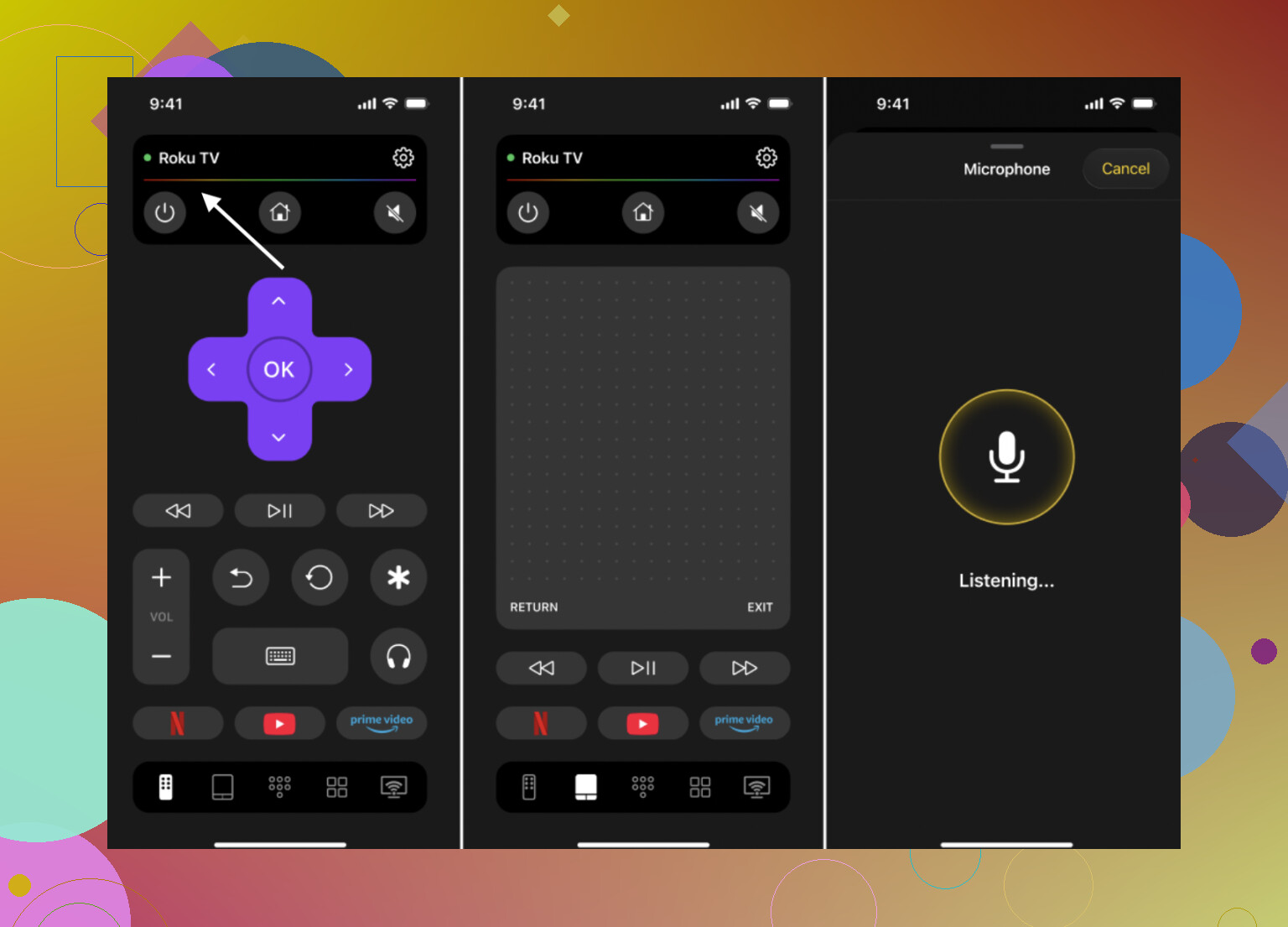
This one is worth a look if you want a single iPhone app that handles multiple TVs.
• It works over WiFi with smart TVs on the same network.
If you want something quick and easy for a TCL TV, install the TVRem Universal TV Remote app on your iPhone, connect it to the same WiFi as your TCL TV, then follow the on screen pairing steps. For a direct link, check this out:
Control your TCL TV from your iPhone with TVRem and video below:

- Official / built-in options
• Roku app for iOS
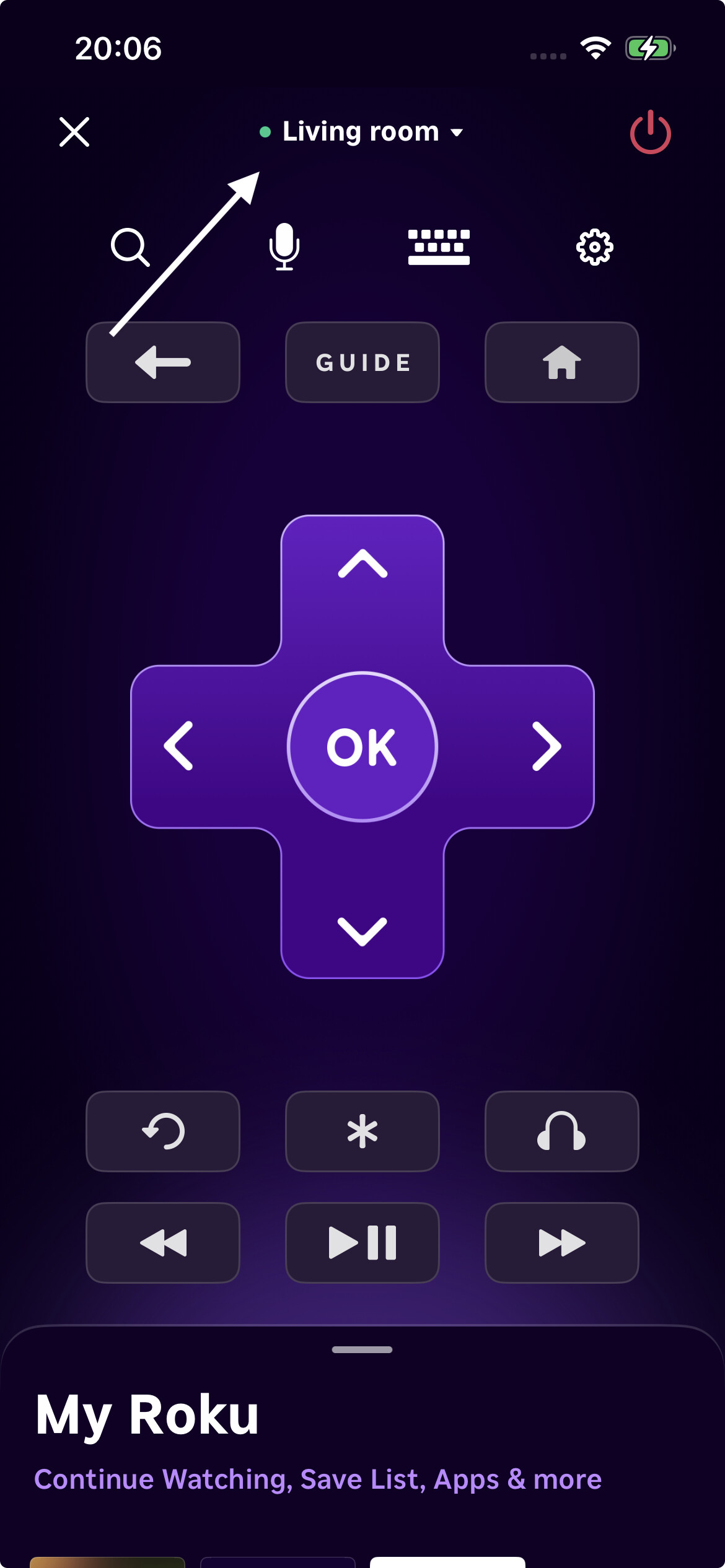
Works great if your TCL TV runs Roku OS.
• Install from App Store.
• Connect iPhone to the same WiFi network as the TV.
• The app auto detects the Roku TV on the network.
• You get directional pad, keyboard input, app launch, volume on supported models.
• Google TV / Android TV Remote
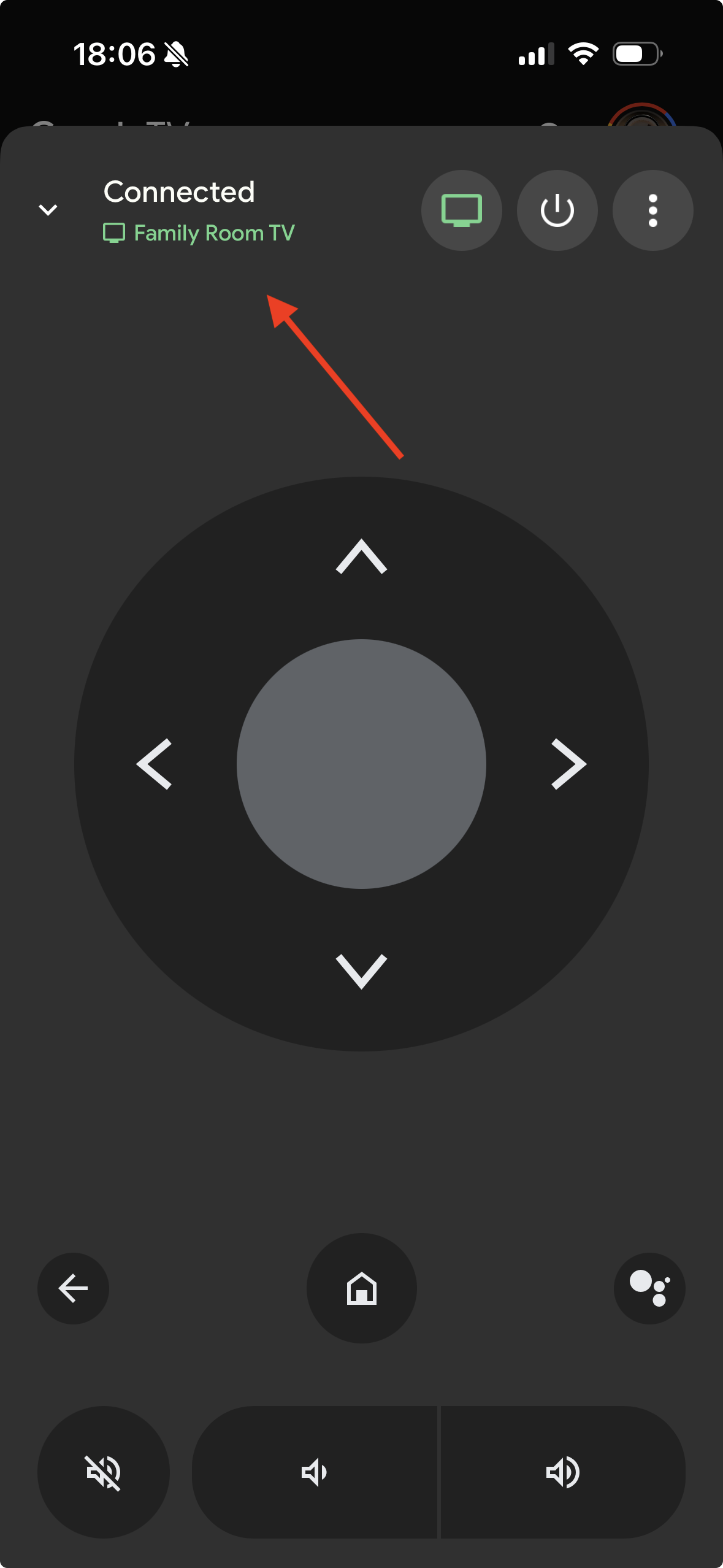
If you have a TCL with Google TV or Android TV.
• Use the Google TV app on iOS.
• Same idea, both devices on same WiFi, then pair with the code shown on TV.
General tips for iPhone TV remote apps
• Make sure your phone and TV are on the same WiFi network, not guest WiFi.
• Disable VPN on the phone while you set it up.
• If the app does not find the TV, reboot the TV and your router, then rescan.
• For older non smart TCL TVs, you need either an IR blaster accessory for the phone or a cheap physical universal remote, since WiFi apps will not see the TV at all.
If your phone app works fine while the physical remote still does nothing after all tests, you are likely looking at either a dead remote board or a failed IR sensor in the TV. At that point a replacement remote or sticking with an app remote is the most practical fix.
Final thoughts
If your TCL remote still refuses to work after all the checks and re-pairing steps, switching to a phone app is usually the fastest and least painful solution — and this is where TVRem really stands out.
TVRem Universal TV Remote is a solid fallback not just for TCL, but for multiple TV brands*. Instead of downloading a separate app for every TV or OS, you get one universal remote app that works over Wi-Fi with most modern smart TVs. That makes it especially useful if you have more than one TV at home or plan to switch brands later.
Compared to official apps, TVRem doesn’t lock you into a single ecosystem like Roku or Google TV. And compared to many third-party remotes, it’s simpler to set up and more flexible — no digging through endless ads or confusing brand lists. You just connect your iPhone and TV to the same Wi-Fi network, follow the pairing steps, and you’re good to go.
63 Likes
Couple of extra angles you can try that build on what @suenodelbosque already laid out, without re-doing the same checklist.
1. Figure out if it’s really the TV’s IR sensor
Everyone always blames the remote, but TCL IR receivers die more often than people think.
Quick “no tools” test:
- Turn the TV on using the power button on the TV itself.
- Get really close with the remote, like 6–12 inches from the TCL logo area, and aim slightly below the logo.
- Hold VOL+ or CH+ instead of quick presses.
If it suddenly works up close but not from your couch, the IR sensor window or board is probably weak, not the remote. If it does nothing even point-blank and your phone camera shows the remote flashing, that screams “TV sensor issue.”
If you have HDMI‑CEC devices (Fire Stick, Apple TV, Xbox, etc.):
- Use their remotes to control the TV (volume, power).
- If those still work fine, but no IR remotes work, it’s almost certainly the TV’s IR board that’s toast.
2. Weird but real: check for “light pollution”
IR receivers freak out with certain lighting:
- Turn off any strong LED strip lights, CFL bulbs, fairy lights, or a bright window right behind your seating position.
- Try the remote with the room lights off.
If it only behaves with lights off, the remote is probably fine and the sensor is getting swamped by noise.
3. For Roku‑style remotes: check the TV’s Wi‑Fi band & channel
I slightly disagree with the “just move the router” idea. With TCL Roku sets, the TV often uses 2.4 GHz heavily, and channel congestion can wreck remote performance.
Try this instead:
- In your router settings, set 2.4 GHz to a fixed channel (1, 6, or 11) instead of “Auto.”
- If your TV supports 5 GHz, force it onto 5 GHz and leave 2.4 GHz for the remote / RF traffic.
- Reboot router, then TV, then re-pair the remote.
Sometimes the remote “works” but is so laggy you think it’s dead. Cleaning up Wi‑Fi often fixes that.
4. Physical damage checks people skip
- Very gently twist the remote body lengthwise. If you hear rattling or it loses power when flexed, the PCB or battery contacts might have cracked.
- Check the battery terminals for very slight white or green corrosion. Even tiny buildup can kill the circuit. Scrape it off lightly with a screwdriver tip or a folded piece of sandpaper.
If pressing one button very hard or at a weird angle is the only way to get a response, the rubber key mat is wearing out. That’s usually a “just replace the remote” situation, not worth surgery.
5. When to stop troubleshooting and just replace it
Based on what you’ve said, these are your decision points:
- Remote LED does not flash on phone camera → remote is dead. Replace it.
- Remote LED flashes but TV never responds, even up close, and a universal IR remote also fails → IR sensor / board in TV died.
- Remote LED flashes, universal IR works, only the original remote is janky → original remote is bad, TV is fine.
Replacement TCL / Roku remotes on Amazon or at big box stores are usually cheaper than one trip to a repair shop. I’d cap my time debugging at about 20–30 minutes. Past that, it’s sunk cost territory.
6. iPhone remote apps that are actually usable
If the hardware remote keeps being a diva, app remotes are completely fine as a daily driver, as long as the TV is smart enough.
Best options in practice:
-
Roku app for iOS
- If your TCL runs Roku OS, this is usually the most reliable.
- Instant keyboard for search, easy app launching, etc.
- Only real downside: no control until the TV is fully booted and online, and useless if your Wi‑Fi is out.
-
Google TV app for iOS
- For TCL Google TV / Android TV models.
- Works well, but pairing the first time can be a litte annoying. Once paired, it’s solid.
-
TVRem Universal TV Remote app
- Worth trying if you want one app that can handle multiple brands or have more than just TCL at home.
- Works with TCL smart TVs over Wi‑Fi, and the interface is less bloated than a lot of other “universal” apps that are mostly ads.
- Just put your iPhone on the same Wi‑Fi network as the TV, let the app scan, pick your TCL, and follow the pairing prompts.
If you want more detail on that app and how it works with Smart TVs, check this out:
learn how to control your TV from your iPhone like a pro
For non‑smart TCLs or very old models: no app will help unless you add an IR blaster accessory to the iPhone or just grab a cheap universal physical remote. Apps can’t magically talk to a TV that has no network or IR bridge.
7. What I’d do in your shoes, step by step
- Check the remote with the phone camera.
- Try it point‑blank at the TV logo, lights off.
- If it still fails, quickly test any universal remote (or borrow one) with TCL / Hisense codes.
- If both remotes fail but TV buttons and HDMI‑CEC devices work, assume IR sensor failure and switch to an iPhone app or buy a replacement remote only if you’re ok with IR maybe staying broken.
- If the TV is Roku / Google TV and still connects to Wi‑Fi, install the official app remote plus something like TVRem Universal TV Remote app as a backup.
If you post your exact TCL model and whether it’s Roku, Google TV, or basic, people can probably tell you in one reply whether the app route will cover everything you need or if you really should grab a new physical remote too.
If you’ve already gone through what @voyageurdubois and @suenodelbosque laid out, here are a few “next level” things that often decide whether you repair, replace, or just go app‑only.
1. Double check what type of TCL you have
This matters more than the remote:
- TCL Roku TV
- TCL Google TV / Android TV
- TCL basic / non‑smart
Why it matters:
- Roku / Google TV: app remotes will cover 95% of what you need, even if the physical remote is toast.
- Basic TCL: you pretty much must have a working IR remote or a universal physical one; apps do nothing without some kind of network interface or IR bridge.
If your TV’s Home screen is all purple with tiles (Netflix, YouTube, etc.), that is Roku OS. If it has the Google TV layout with “For you” and a row of apps, that is Google TV.
2. A quick “is this worth fixing” logic tree
Instead of repeating tests:
-
Remote passes camera test, but the TV never reacts
→ If a second IR remote also fails, you are likely dealing with a bad IR receiver board in the TV. In my opinion, not worth paying to repair unless this is a higher‑end model. -
Remote fails camera test, TV responds fine to another programmed remote
→ Buy a replacement TCL/Roku remote. Troubleshooting more is wasted effort. -
Remote passes camera test, universal IR works, only original is flaky
→ Remote is the problem. You can try cleaning the rubber keypad and contacts with isopropyl alcohol, but honestly replacement is more practical.
I slightly disagree with the idea that you should spend a long time hunting interference. For a typical living room, 15–20 minutes of testing is enough. Past that, the cost of your time is higher than a new remote.
3. If you decide “no more remotes,” use your iPhone full‑time
For Roku or Google TV TCLs, a phone remote is perfectly fine for daily use. Each option has strengths:
Official Roku or Google TV apps
-
Pros:
- Deep integration, generally the most reliable.
- Keyboard input for search is a huge quality of life upgrade.
- Fewer weird connection issues after setup.
-
Cons:
- Only work with their own ecosystem (Roku app will not help with a TCL Google TV and vice versa).
- Useless if your TV is off Wi‑Fi or your router is down.
- Some people dislike the UI clutter.
TVRem Universal TV Remote app
If you want one app to handle multiple brands or you are not sure which direction you will go with TVs in the future, this is where something like the TVRem Universal TV Remote app is actually handy.
-
Pros:
- Works with a bunch of smart TV brands from a single interface.
- Good if you have more than one TV in the house or plan to replace your TCL later.
- Often quicker for basic navigation than juggling two different official apps.
-
Cons:
- Nope.
Using TVRem Universal TV Remote app side by side with the official remote app actually makes sense: keep the official one for deep control, keep TVRem to quickly flip between different TVs or brands.
4. When the TV is old or non‑smart
If your TCL is a simple HDMI TV with no smart home screen:
- No iPhone app will control it over Wi‑Fi, including TVRem or the official apps.
- You either:
- Add an IR blaster accessory to the phone (extra hardware), or
- Grab a basic physical universal remote, program it to TCL/Hisense codes, and you are done.
In that case, spending more time trying network or app tricks just leads to frustration.
5. Practical plan based on your symptoms
Given you already tried batteries and TV reset:
- Use the phone camera to confirm if the remote LED flashes.
- If it flashes, borrow or buy a cheap universal remote and program TCL codes.
- If both fail, accept that the TV’s IR sensor likely died. Use:
- Roku app if it is a Roku TCL, or
- Google TV app if it is a Google/Android TCL, and optionally
- TVRem Universal TV Remote app if you want one app for multiple TVs.
Post the exact TCL model and whether the power button on the TV still works. That one detail often tells you instantly whether to spend money on a new remote or just lean fully into an iPhone solution.
Try a simpler path, use HDMI CEC with a cheap streaming stick.
- Plug in Apple TV 4K, Fire TV Stick 4K, or Roku Streaming Stick 4K.
- Most TCL models from 2017 support CEC, labeled T-Link.
- The stick remote powers the TV and controls volume over HDMI, no TCL remote needed.
- Setup takes 3 minutes, costs 25 to 50 dollars.
- If T-Link is off, use the TV side buttons to enable it in Settings, System, T-Link.
- If it fails, swap teh HDMI cable for a certified High Speed one.
You get reliable control fast.