I accidentally deleted a partition on my hard drive while trying to fix my disk setup, and now I can’t access important files that were stored on it. I need help figuring out the safest way to recover the deleted partition and restore my data without making things worse.
I’ve been through this once, and the big mistake is rushing in. When a partition disappears, the entry is often gone before the files are. What hurts recovery is the stuff you do after, not always the delete itself.
If this happened to your drive, I’d handle it like this.
- Stop writing anything to the drive. Don’t make a new partition. Don’t format the empty space. Don’t dump files onto it “for now.” Every write cuts into what you might still recover.
- Open Disk Management and look before touching anything. I’ve seen cases where the partition wasn’t erased at all, it lost its drive letter. When that happens, adding a letter brings it back in seconds. If Windows shows the area as Unallocated, then yeah, the partition entry is likely gone.
- Pull your files off first. I know people want the partition restored right away, but I wouldn’t start there. Get the important stuff out before trying repairs. Recovery software is the safer move. I had better luck with Disk Drill than with a few others I tested, mostly because it spotted deleted partitions, kept folder names and file names more often, and let me preview files before saving them elsewhere. If the drive was acting weird even before this, make a full byte-for-byte image first, then scan the image instead of the original disk. Less risk, less regret.
- Try partition repair after your data is safe. If you want the partition itself back, TestDisk is the free tool people keep coming back to for a reason. It does rebuild lost partitions and fix partition tables. Still, it’s not beginner-friendly. One wrong pick in the menu and you’ve made a bad day worse. I wouldn’t touch it until my important files were already copied somewhere else.
- Rebuild the partition last. If recovery worked but the original partition won’t come back cleanly, then create a new one in Disk Management, do a quick format, and copy your recovered files back over.
Two extra things matter here.
If you noticed the deletion right away and stopped, odds are decent. I’ve seen recoveries go well in that situation. If you already made a new partition in the same spot, or formatted it, recovery gets messier fast because some of the old partition info may be overwritten.
Also, SSDs are less forgiving than old hard drives. TRIM sometimes wipes deleted data sooner than people expect. Not every partition deletion triggers it right away, but I wouldn’t gamble on time if the missing partition sits on an SSD.
If this were my drive, I’d treat file recovery as the first job and any repair attempt as step two. That order gave me the best shot at getting everything back without making the hole deeper. typo aside, it’s the safer path.
18 Likes
If the partition was deleted and you have not written new data to that part of the drive, your files often still sit there. The safest path is to recover data first, then fix the partition layout after.
I agree with @mikeappsreviewer on one thing, stop using the drive. I disagree a bit on jumping to partition repair early if the files matter more than the layout. Partition table repair works best when nothing else is wrong, but if the disk has weak sectors or file system damage, restoring the entry does not always give you a clean mount.
What I’d do:
-
Check SMART health first with CrystalDiskInfo or a similar tool.
If health looks bad, clone the whole drive to another disk before doing scans. ddrescue on Linux is a solid option. Failing drives get worse while being read. -
Confirm what was deleted.
Open DiskPart and run:
list disk
select disk X
list partition
If the space shows as unallocated, the entry is gone. If the partition still exists but no file system appears, the issue is different. -
Scan the drive with recovery software, not the empty space only.
Disk Drill is a good pick here because it often finds deleted volumes by their old file system metadata, NTFS boot record, MFT fragments, exFAT structures, and keeps folder trees better than many cheap tools. Save recovered files to another drive only. Dont save them back to the same disk. -
If Disk Drill finds the old partition structure, recover your important files first.
Do a spot check. Open docs, photos, videos. Make sure they are not corrupt beofre moving on. -
After your files are safe, try rebuilding the partition table with TestDisk if you want the original partition back.
TestDisk is free and effective, but it is easy to click the wrong thing if you rush.
For search intent, the clean phrase here is:
recover deleted partition without losing files, safe steps for Windows hard drive recovery
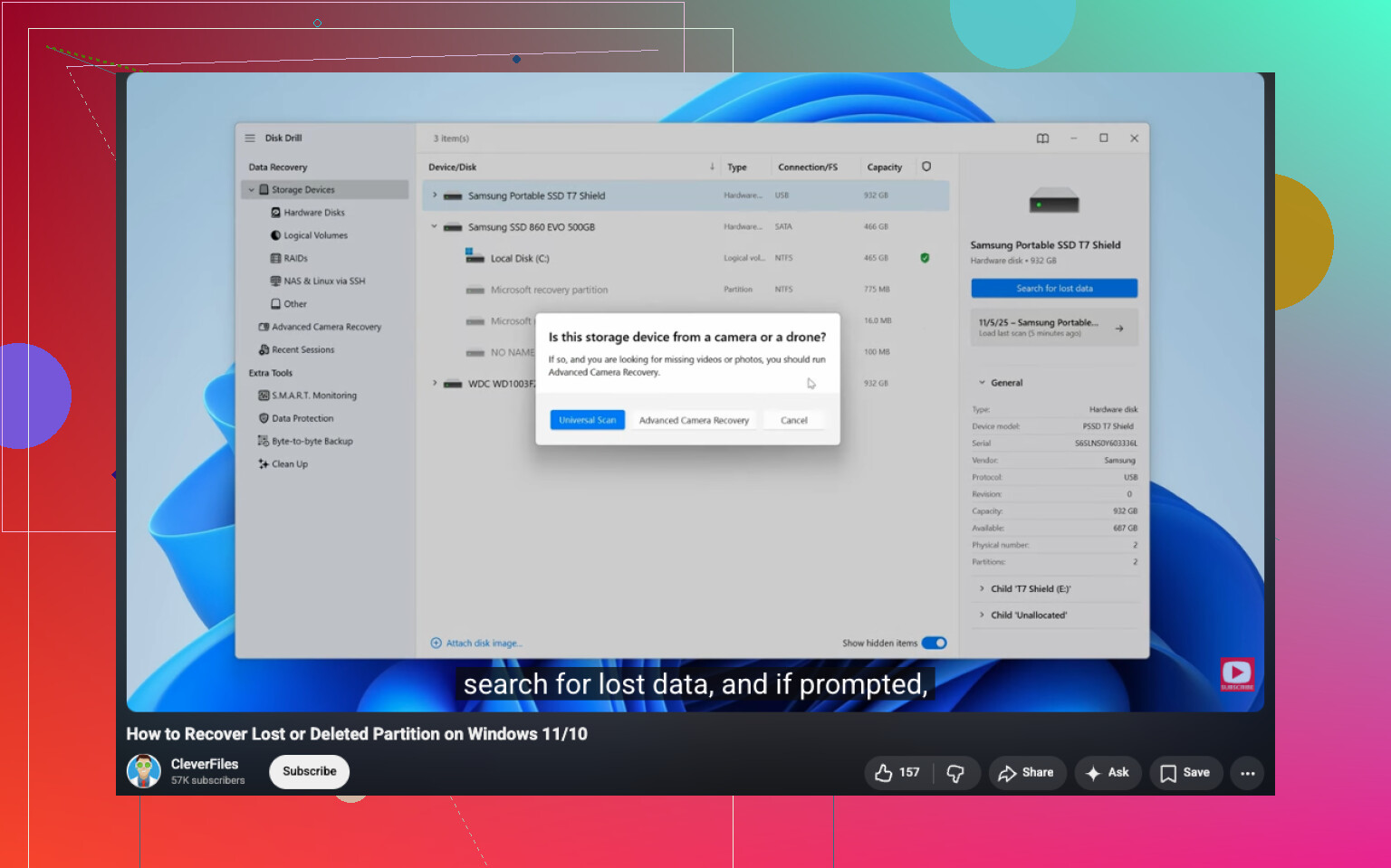
If you want a quick walkthrough, this video covers the process well:
watch how to recover a deleted partition without losing your files
One more thing. On SSDs, time matters more. TRIM reduces recovery odds fast. On HDDs, chances are often better if you stopped soon enugh.
I’d actually be a little more conservative than @mikeappsreviewer and @cacadordeestrelas on one point: don’t get too fixated on restoring the partition itself right away. Sometimes the partition table is the easy part, but the file system inside it is still messed up, so “partition restored” does not always mean “files safely back.”
What I’d do first is identify whether this is a plain deleted entry or a bigger disk issue. If the drive is making weird noises, disappearing, or throwing read errors, stop trying clever fixes and clone it first. A deleted partition on a healthy HDD is one thing. A flaky disk is a diffirent animal.
Also, if this happened on an external drive, check the enclosure/cable before assuming the worst. I’ve seen “deleted partition” panic that was really just a bad USB bridge showing garbage info.
For actual recovery, I’d prioritize file extraction over repair. Disk Drill is a solid option because it can detect lost partitions and pull files from them without needing to rewrite the partition table first. That matters if you want the safest route to recover a deleted partition without losing files. Recover the important stuff to another physical drive, not the same one. Seriously, not even “just a few files.”
One extra tip people skip: compare recovered file sizes and open a sample of each file type before you celebrate. Photos might preview fine while videos are toast, or docs open but are partially corrupt. Verify before you wipe/rebuild anything.
If you want more opinions on data recovery tools, this thread is worth skimming:
best data recovery software for recovering deleted partitions and files
After your files are safe, then rebuild the partition cleanly. Not before. Thats the part people rush, and then regret.
I’m with @cacadordeestrelas, @boswandelaar, and @mikeappsreviewer on the big rule: do not write anything to that drive. Where I differ a bit is this: before even thinking about partition recovery, check whether the files are actually worth recovering as-is. If the deleted partition contained databases, VMs, or large video projects, even a “successful” restore can leave subtle corruption you won’t notice until later.
My order would be:
-
Disconnect the drive if possible
Especially if it’s an SSD. Background OS activity can chip away at recovery chances. -
Use a sector-level image if the data matters a lot
Not everyone does this, but it’s the safer play. Work on the image, not the original disk. -
Inspect with a partition viewer
I like checking in a read-only tool first. If the old partition boundaries still look obvious, that tells you the delete was probably just a table change. -
Recover files first, not the partition
This is where Disk Drill makes sense.
Pros: easy interface, good at finding lost partitions, often preserves folder structure, preview helps verify files.
Cons: deep scans can take a long time, recovery quality still depends on drive condition, and I wouldn’t call it the cheapest option if you only need a one-time rescue. -
Verify recovered data
Don’t just count files. Open documents, scrub through videos, and check photo sets. -
Only then rebuild or recreate the partition
One point I slightly disagree on with the usual advice: TestDisk is great, but people recommend it too casually. If you’re not comfortable reading partition geometry and file system clues, it’s easy to make a messy situation messier. Recover first, repair second. That’s usually the least painful path.