I accidentally formatted the SD card in my Nikon camera before backing up my pictures, and now all my photos are gone. These images are really important, and I need help figuring out the best way to recover deleted photos from a formatted Nikon camera SD card without making things worse.
I ran into this with a Nikon SD card a while back. Short version, yes, there are free ways to try recovery, but what works depends on what happened after the deletion.
The first thing I did was stop using the card. Do this before anything else. If you kept shooting after the photos were deleted, recovery odds drop fast because new files write over the old data. Once overwritten, those shots are usualy gone.
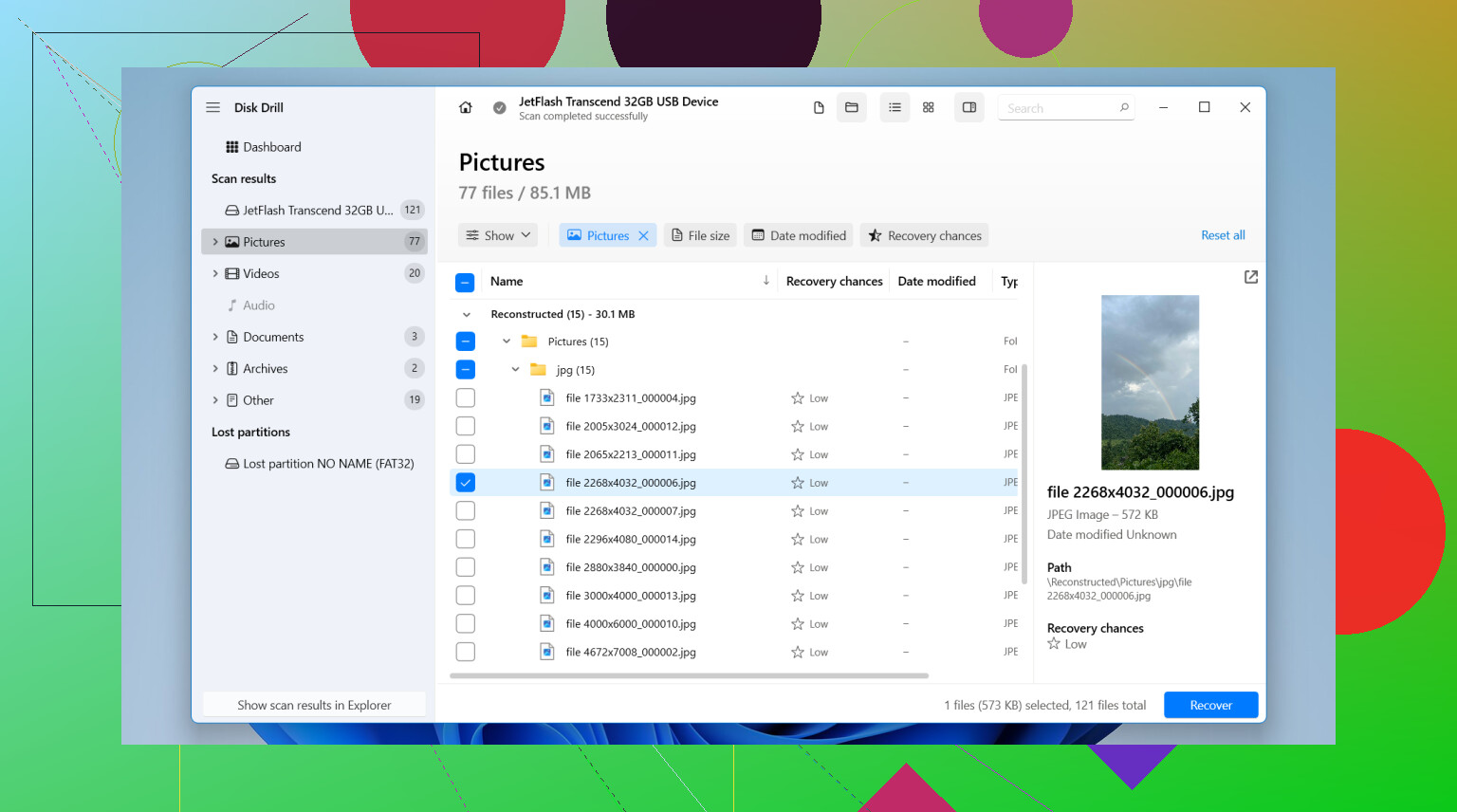
If the card still mounts in Windows, I’d start with Disk Drill. The free limit is 100 MB. That is enough for a few JPEGs, or at least enough to see whether the missing Nikon files still show up in scan results before you spend money.
What I did looked like this:
- Powered off the camera, pulled the SD card, and put it in a card reader.
- Installed Disk Drill on the PC, not on the SD card.
- Opened the app, picked the SD card, and started Search for lost data.
- Used Universal Scan. For simple deletion cases, it tends to be the safe first pick.
- Waited for the scan to finish, then checked previews to see if the images opened cleanly.
- Selected the files I wanted and hit Recover.
- Saved everything to the computer, never back onto the same card.
If your missing files are over 100 MB and you don’t want to pay, PhotoRec is the usual free answer people bring up on forums for a reason. It works. I’ve seen it pull photos off cards other tools missed. The tradeoff is the interface feels rough, there’s no nice preview flow, and recovered files often come back with messy names and no original folders. It’s not hard in the deep technical sense, but it is annoying.
One thing people skip over, Nikon RAW matters here. If you shot NEF instead of JPEG, check file support before you waste time scanning. Some free tools do fine with normal photos and then stumble on RAW formats.
I’d also check the boring places before recovery. If you ever copied the card to your laptop, imported into Lightroom, used SnapBridge, or had cloud sync running, your photos might already exist somewhere else. I found a missing set once in an old import folder and felt kinda dumb after spending an hour scanning.
The practical order I’d follow:
- Stop using the SD card right away.
- Use a card reader, not the camera over USB.
- Try Disk Drill first if 100 MB is enough for your case.
- Use PhotoRec if you need a full free option and don’t mind a clunkier process.
If the card is damaged, throws read errors, or the computer doesn’t detect it at all, I wouldn’t keep poking at it with random tools. For important photos, I’d stop there and hand it off to a recovery shop. I’ve seen people make it worse by retrying stuff for hours.

11 Likes
Formatting in a Nikon usually wipes the file table, not the photo data right away. So your best odds come from doing less, not more. Stop using the card. Do not shoot one more frame. Do not format it again.
I agree with @mikeappsreviewer on the first part, but I would add one thing. Before recovery, make a full image of the SD card if your PC reads it. Use something like USB Image Tool or Win32 Disk Imager. Work from the image, not the card. If a scan crashes or the card starts throwing errors, you still have a clean copy. People skip this step and regret it.
For Nikon cards, pay attention to file types:
- JPEG, easier to recover and preview.
- NEF RAW, larger and slower to scan.
- MOV or MP4 video, often fragmented and harder.
Disk Drill is a solid first pick because it handles common camera formats well and previews results cleanly. If you see your Nikon NEF or JPG files in preview, your odds are decent. I would sort scan results by file type and date first. That saves time.
One more thing. Quick format and full format are different. A quick in-camera format often leaves lots of recoverable data. A full overwrite format is a diffrent story and recovery rates drop hard.
If the files matter enough, skip experiments after one solid scan and go to a lab. Here’s a useful thread with Reddit photo recovery recommendations and user experiences, urgent photo recovery tips from photographers.
Save recovered files to your computer or another drive, never back to the Nikon SD card. Thats the part people mess up most.
If the Nikon card was formatted in-camera and then not used again, recovery is still pretty possible. I mostly agree with @mikeappsreviewer and @techchizkid, but I’m a little less enthusiastic about throwing a bunch of recovery apps at the card right away.
What I’d do first is check whether the card was quick formatted or actually overwritten. Most Nikon in-camera formats are basically quick wipes of the index, not a true erase. That means the photos may still be there, just invisible to the camera.
A few things people forget:
- Try the card on another reader if it acts weird. Bad card readers cause fake “corruption” all the time.
- Look in hidden folders like DCIM, MISC, and sometimes weird temp dirs if the format didn’t fully complete.
- If you shot RAW+JPEG, you may recover only one version of each photo, so don’t panic if counts look off.
- If the SD card is microSD in an adapter, the adapter itself might be the problem. Seen that more than once.
I’d still use Disk Drill as one of the first serious options because it’s easy to sort Nikon JPG and NEF results, and the preview makes it obvious whether the files are real or just junk entries. But before recovering, save the scan results and recover to a totally different drive. Not the same card. Thats how people turn a recoverable mistake into a permanent one.
One spot worth checking for a simple walkthrough is this SD card recovery software guide for lost camera photos.
Only place I kinda disagree with @techchizkid is the “go to a lab fast” advice. If the card is readable and you have not written new data, one careful scan at home is usually fine. If the card is making errors, disconnecting, or showing 0 bytes, then yeah, stop messsing with it and consider pro recovery.