I’m tired of the default Android File Transfer constantly crashing or failing to detect my phone on macOS. I found OpenMTP and it looks promising, but I’m not sure if it’s stable, safe, and actually better for large file transfers, backups, and everyday use. Can anyone share real-world experience, pros and cons, and whether it’s reliable enough to fully replace Android File Transfer on a Mac?
OpenMTP on macOS – My Experience 

I’ve been using OpenMTP for a while to move files between my Android phone and Mac. Like a lot of people, I got tired of unreliable transfer apps and wanted something simple that just works.
Here’s how it’s been for me.

First Impressions
The setup was straightforward. Plug in the phone, open the app, and you’re presented with a dual-pane window: Mac files on one side, phone storage on the other.
It feels practical rather than fancy. You drag files back and forth like you would in Finder. No complicated sync setup, no account logins. Just file transfer.
What stood out to me early on:
-
Clean dual-pane layout
-
Drag-and-drop works as expected
-
Handles large files without much fuss
-
Free and open-source
For basic file transfers – videos, photos, music – it does the job without feeling clunky.
Day-to-Day Use
In normal use, OpenMTP has been fairly stable for me. Transfers are reasonably fast over USB, and I’ve moved multi-gigabyte video files without the app choking.
It also works on newer versions of macOS (Catalina and later), and recent updates seem to have improved compatibility with certain Android devices, including Samsung phones.
It’s not flashy, but it’s practical. I open it, move what I need, and close it.
The One Big Problem 
The main issue I’ve run into is a connection conflict.
If another MTP tool is installed or running – especially Google’s old Android File Transfer app – OpenMTP sometimes refuses to recognize the phone. It just sits there without connecting.
This becomes annoying in daily use because:
-
You plug in your phone expecting a quick transfer.
-
Nothing shows up.
-
You have to quit the other app (or sometimes uninstall it).
-
Then unplug and reconnect the phone.
It breaks the “plug in and go” routine. If you forget that another MTP service is running in the background, you can waste several minutes troubleshooting something that isn’t obvious.
Once the conflict is resolved, it works fine – but the experience can feel fragile if you switch between tools.
Alternatives I’ve Tried
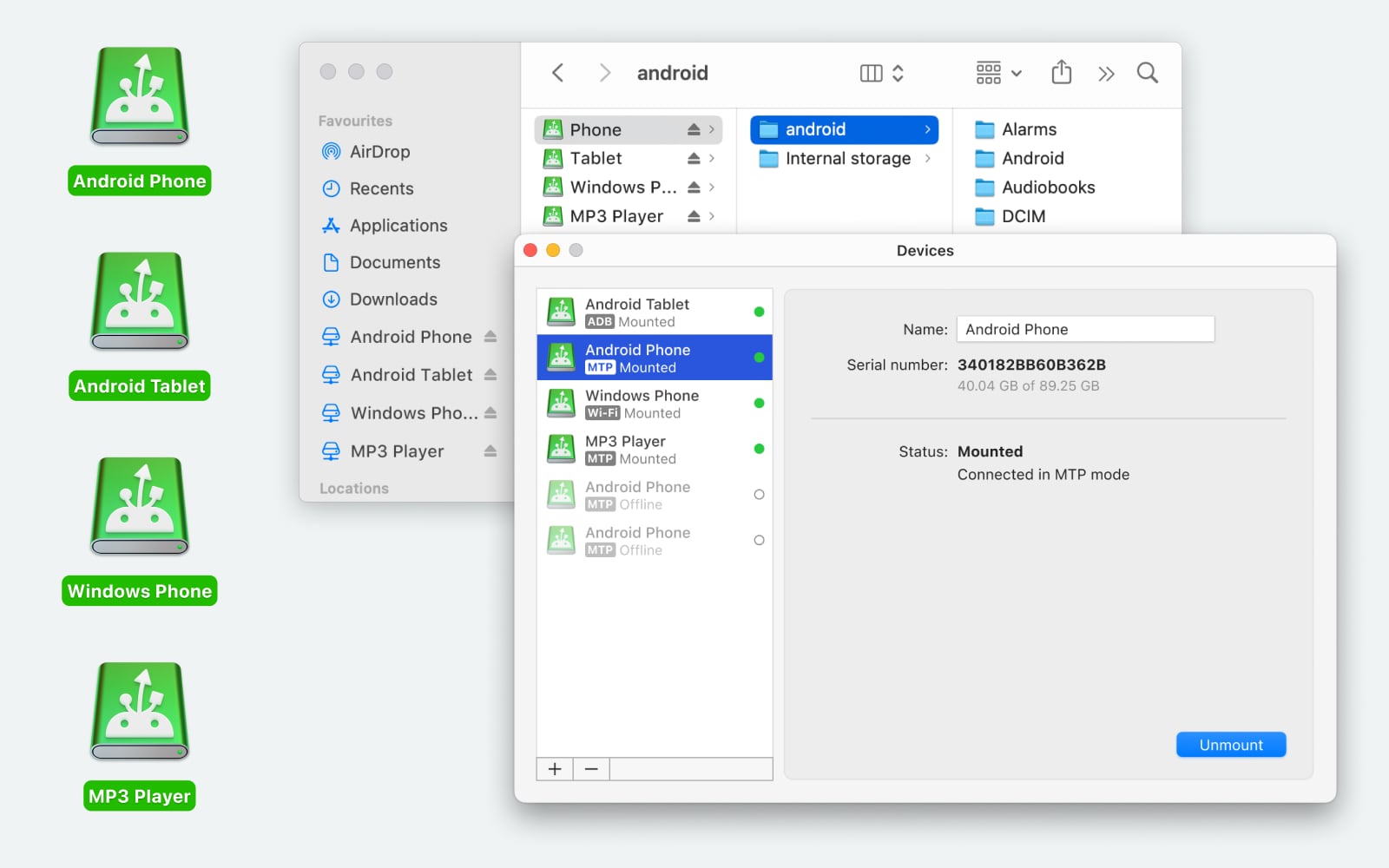
I also spent some time with MacDroid. It mounts your Android device as if it were a regular disk in macOS Finder. It is highly praised for its seamless integration, allowing direct editing of files and fast transfer speeds, though it requires a subscription for full two-way functionality. For me, that makes moving files feel more natural and a bit faster for small tasks. There’s a free version, but some of the smoother features like automatic mounting and faster transfers require paying for the full version. Still, if you work with files regularly, having the phone show up right in Finder can be worth it.
Another option I’ve used is NearDrop. It uses Android’s Nearby Share to send files over Wi-Fi. That means no wires and no USB at all – you just pick a file on your phone, send it to your Mac, and it appears in a chosen folder. It’s quick and handy, especially for photos or documents. One drawback is that it’s wireless only, so you’re relying on a good Wi-Fi connection. If the signal is weak or you’re on a shared network with interference, transfers can slow down or fail, which isn’t great for larger files.
Final Thoughts
OpenMTP is a solid free option for moving files between Android and macOS. It’s simple, fast enough for large transfers, and doesn’t overload you with extra features.
The connection conflict with other MTP apps is something to be aware of, especially if you’ve installed multiple Android transfer tools in the past. If you stick to one app and keep your setup clean, it can be a reliable part of your workflow.
234 Likes
Short answer from my side: yes, OpenMTP is worth using as your main Android file transfer on mac, as long as you accept its limits and set it up clean.
A few concrete points.
- Stability vs Android File Transfer
Android File Transfer is infamous for:
• random crashes
• “can’t connect” errors
• failing on big folders
OpenMTP is more stable in daily use. It still hiccups sometimes, but for most people it is a big step up.
I disagree a bit with @mikeappsreviewer on one thing. You do not always need to uninstall every other tool. You do need to kill anything that auto grabs MTP though.
Minimum steps that help a lot:
• disable Android File Transfer from auto starting
• quit it from the menu bar before you plug in
If you still hit issues often, then remove AFT.
- Safety and privacy
OpenMTP is open source.
• No account.
• No cloud sync.
• Files go over USB, local only.
If you get it from the official site or GitHub and keep macOS Gatekeeper on, risk is low. It asks for the normal disk and USB related permissions.
- Large file handling
This part matters for you.
On typical USB 3 connection I see:
• 40–80 MB/s to internal SSD on newer Macs
• 20–40 MB/s to older spinning drives
That is fine for:
• 4–10 GB video files
• big photo backups
• whole DCIM folder pulls
Where it struggles a bit:
• tens of thousands of tiny files in many subfolders
Directory listing over MTP is slower by design, not only OpenMTP’s fault.
If your main use is a few huge video files, OpenMTP is solid.
If your main use is syncing some nested dev folders, it feels clunky.
- Workflow fit
Good if you:
• like a clear “phone on the right, Mac on the left” panel
• prefer manual control
• plug in, move what you want, unplug
Not so good if you want:
• background sync
• automatic photo import into Photos app
• Finder integration
This is where I lean a bit different from @mikeappsreviewer. I think if you live inside Finder all day and want the phone to behave like a disk, MacDroid is a better primary tool, even if you pay. It mounts Android in Finder, so no extra app window, and for some people that is a big time saver.
- What I would do in your position
If you are fed up with Android File Transfer crashing, try this setup:
• Step 1: Remove or at least fully quit Android File Transfer.
• Step 2: Install OpenMTP, run a few test transfers:
- one 5–10 GB video
- one full DCIM backup
- a folder with a few hundred mixed files
• Step 3: If you like the dual pane view and it behaves on your hardware, keep it as your main wired tool.
If you later want smoother integration and do frequent transfers, check MacDroid. It is SEO friendly and popular among people who want Android file transfer on Mac to feel more “native” inside Finder.
My personal split:
• OpenMTP as a free, no nonsense main tool for wired and big files.
• MacDroid when I want Finder integration and I am doing many transfers in a day.
So yes, OpenMTP is worth trying as your main solution. Treat it as “one clean MTP tool on the system”, do a few large file tests, and see if the friction level drops compared to what you have now.
Short version: yes, OpenMTP is usually worth using as your main Android file transfer on macOS, but only if you accept a few annoyances and keep your expectations realistic.
I broadly agree with @mikeappsreviewer and @hoshikuzu: it is miles better than the stock Android File Transfer in terms of not randomly exploding, and it handles big files way more reliably. Where I disagree slightly is on how “set and forget” it is once installed.
My take, based on using it on two Macs and three different Android phones:
1. Stability vs AFT
Android File Transfer is basically abandonware at this point. On recent macOS, it’s pure chaos:
- constant “can’t connect to device”
- dies on large folders
- silently fails mid transfer
OpenMTP is not magic, but:
- it detects devices more consistently
- it recovers from hiccups better
- big batches (10+ GB) actually complete
That said, unlike @mikeappsreviewer, I did manage to confuse OpenMTP just by leaving it running for hours. If you leave it open in the background while suspending your Mac, unplugging the phone, switching phones, etc., it sometimes gets into a “no device” state until you quit and relaunch. So my rule: use it like a tool, not a daemon. Open, transfer, close.
2. Safety / privacy
On the “is it safe” question:
- open source, no account, no cloud login
- transfers are local over USB only
- it asks for sane macOS permissions
As long as you download from the official project page or GitHub and keep Gatekeeper on, it’s about as safe as anything in this space gets. I actually like it more than some closed-source “phone manager” apps that want contacts, messages, etc., just to move photos.
3. Large files & big jobs
You specifically mentioned large files. This is where OpenMTP is actually strong:
- 4–10 GB video files: generally fine, consistent throughput on USB 3
- pulling entire DCIM folder: slower on first directory load, but the copy itself is stable
- thousands of tiny files: this is where MTP as a protocol just sucks, no matter the app
If your main pain is “AFT dies when I copy a 6 GB 4K video,” then yes, OpenMTP is a noticeable upgrade.
Where I’ll slightly push back on @hoshikuzu: disabling other tools is often not enough. On some setups I had to fully uninstall Android File Transfer because its background helper kept sneaking in and grabbing the MTP connection. So if OpenMTP is randomly not seeing your phone, I’d nuke AFT entirely instead of just trying to tame it.
4. Workflow fit
When does OpenMTP make sense as your main tool?
Good fit if you:
- are fine with a dedicated dual-pane app instead of Finder
- like manual, “I see every file I move” control
- mainly do occasional big transfers (photos, videos, downloads)
Less ideal if you:
- want something that behaves like a mounted drive in Finder
- expect automatic sync or photo import
- constantly jump between many folders all day
In that case, I’d seriously look at MacDroid. It’s more “native-feeling” because it mounts your Android inside Finder so it looks like an external disk. For people who live in Finder and want less context switching, MacDroid is honestly better suited as the primary workflow, even if some of the nicer stuff is paywalled.
My own setup ended up like this:
- OpenMTP for free, straightforward wired transfers when I just need to dump or grab a bunch of files and don’t care about Finder integration.
- MacDroid when I’m doing a lot of back-and-forth and want the phone to behave like a regular drive in Finder. The time saved in that workflow justified paying for it.
5. What I’d do in your situation
Given your frustration with AFT:
- Completely remove Android File Transfer from your Mac. Not just “don’t open it,” fully uninstall it.
- Install OpenMTP and test these cases on your own setup:
- one 5–10 GB file
- a full DCIM copy
- a mixed folder with a few hundred files
- If it behaves for those, use it as your main wired solution.
- If later you find the separate window annoying or you want something more integrated into macOS, trial MacDroid as a “Finder-native” alternative.
So is OpenMTP worth it as a main tool? For most people sick of Android File Transfer: yes. It is more stable, safer design-wise, and definitely better with large files. It’s just not perfect, and if you care a lot about Finder integration, MacDroid is the one you’ll probably end up paying for.
Short version: yes, OpenMTP is generally worth using as your main Android file transfer on mac, but only if you’re okay with a “utility, not ecosystem” mindset and you accept that MTP itself is the weak link.
Where I line up with @hoshikuzu, @cacadordeestrelas and @mikeappsreviewer: it crashes less than Android File Transfer, handles big video files far more reliably, and is safer from a privacy perspective than the heavy “phone manager” suites. USB‑only, open source, no account, no random cloud is exactly what you want if your main goal is “get my stuff off the phone.”
Where I differ a bit:
1. Reliability over time
Everyone’s focusing on “does a 10 GB copy finish,” which is fair. What bit me more was session longevity:
- OpenMTP is solid for short, focused sessions.
- If you tend to leave your phone plugged in for hours while you fiddle with different folders, toggle USB modes or sleep/wake the Mac, OpenMTP can get flaky and require a restart of the app.
So if your pattern is “plug in, do a defined job, close the app,” it feels stable. If your pattern is “leave it around all day like a mounted drive,” it feels fragile compared to a proper mount solution.
2. MTP pain vs Finder-style mounts
The three of them already hinted that MTP is slow at listing huge nested folders. I’d push this a bit harder: if you regularly browse and manage lots of directories on the phone, the MTP model in OpenMTP gets annoying fast. It is fine as a pipeline for big transfers; it is not great as a daily browse-and-edit environment.
This is where something like MacDroid matters:
MacDroid pros
- Mounts Android storage as a volume in Finder so it behaves more like an external drive.
- Better for constant back-and-forth: renaming, reorganizing folders, quick one‑file grabs.
- Feels more “Mac‑native” if you already live in Finder and do not want a second file manager.
- In my experience, fewer “no device” surprises if you routinely plug / unplug multiple phones.
MacDroid cons
- Paid for full functionality, and the free mode is limiting if you move a lot of data.
- Still rests on MTP, so it cannot fully escape the protocol’s quirks, just hides them better.
- Extra background component that some people do not like running all the time.
So I slightly disagree with the idea that OpenMTP is always the obvious “main” tool. If you move a ton of files every day and want them to feel like they are just another drive, MacDroid is often the smoother primary choice and OpenMTP becomes the backup “power tool” for when you want a no‑frills, open source option.
3. Safety & trust
On safety, OpenMTP wins points for being open source and simple. I actually trust that more than high‑feature closed apps that want contacts, SMS, backup, etc. That said, I would not treat “open source” as automatic proof of security. Very few people are auditing this stuff line by line. Do the usual basics:
- Download only from the official project release page.
- Let Gatekeeper and your existing security tools do their job.
- Keep macOS updated.
Same logic applies to MacDroid or anything else. None of them should need access to your keychain, contacts, or similar just to shuffle media files around.
4. When OpenMTP really shines
Use OpenMTP as your main tool if:
- Your primary workload is moving batches of large media files.
- You do not care about Finder integration and are fine with a dedicated app window.
- You prefer free and open source over subscriptions, even if UX is a bit more “utilitarian.”
- You are willing to keep the environment “clean” by not running multiple MTP grabbers at once.
Where I am actually less strict than @mikeappsreviewer is uninstalling everything else. On one of my machines, just disabling auto launch for competitors and ensuring nothing sat in the menubar was enough for OpenMTP to behave. On another machine, I really did have to remove Android File Transfer completely. It depends on how many phone tools you have accumulated over the years.
If you want an “it just appears in Finder like a disk” feel, MacDroid is the one I would elevate to “main tool” status, with OpenMTP as the sidekick. If you do infrequent but heavy transfers and like a clear dual‑pane workflow, then OpenMTP is absolutely good enough as your daily driver.